


- Overview
- UI Automation
- About the UI Automation activity package
- Applications and technologies automated with UI Automation
- Project compatibility
- UI-ANA-016 - Pull Open Browser URL
- UI-ANA-017 - ContinueOnError True
- UI-ANA-018 - List OCR/Image Activities
- UI-DBP-006 - Container Usage
- UI-DBP-013 - Excel Automation Misuse
- UI-DBP-030 - Forbidden Variables Usage In Selectors
- UI-DBP-031 - Activity verification
- UI-PRR-001 - Simulate Click
- UI-PRR-002 - Simulate Type
- UI-PRR-003 - Open Application Misuse
- UI-PRR-004 - Hardcoded Delays
- UI-REL-001 - Large Idx in Selectors
- UI-SEC-004 - Selector Email Data
- UI-SEC-010 - App/Url Restrictions
- UI-USG-011 - Non Allowed Attributes
- UX-SEC-010 - App/Url Restrictions
- UX-DBP-029 - Insecure Password Use
- UI-PST-001 - Audit Log Level in Project Settings
- UiPath Browser Migration Tool
- Clipping region
- Computer Vision Recorder
- Activities index
- Activate
- Anchor Base
- Attach Browser
- Attach Window
- Block User Input
- Callout
- Check
- Click
- Click Image
- Click Image Trigger
- Click OCR Text
- Click Text
- Click Trigger
- Close Application
- Close Tab
- Close Window
- Context Aware Anchor
- Copy Selected Text
- Element Attribute Change Trigger
- Element Exists
- Element Scope
- Element State Change Trigger
- Export UI Tree
- Extract Structured Data
- Find Children
- Find Element
- Find Image
- Find Image Matches
- Find OCR Text Position
- Find Relative Element
- Find Text Position
- Get Active Window
- Get Ancestor
- Get Attribute
- Get Event Info
- Get From Clipboard
- Get Full Text
- Get OCR Text
- Get Password
- Get Position
- Get Source Element
- Get Text
- Get Visible Text
- Go Back
- Go Forward
- Go Home
- Google Cloud Vision OCR
- Hide Window
- Highlight
- Hotkey Trigger
- Hover
- Hover Image
- Hover OCR Text
- Hover Text
- Image Exists
- Indicate On Screen
- Inject .NET Code
- Inject Js Script
- Invoke ActiveX Method
- Key Press Trigger
- Load Image
- Maximize Window
- Microsoft Azure Computer Vision OCR
- Microsoft OCR
- Microsoft Project Oxford Online OCR
- Minimize Window
- Monitor Events
- Mouse Trigger
- Move Window
- Navigate To
- OCR Text Exists
- On Element Appear
- On Element Vanish
- On Image Appear
- On Image Vanish
- Open Application
- Open Browser
- Refresh Browser
- Replay User Event
- Restore Window
- Save Image
- Select Item
- Select Multiple Items
- Send Hotkey
- Set Clipping Region
- Set Focus
- Set Text
- Set To Clipboard
- Set Web Attribute
- Show Window
- Start Process
- System Trigger
- Take Screenshot
- Tesseract OCR
- Text Exists
- Tooltip
- Type Into
- Type Secure Text
- Use Foreground
- Wait Attribute
- Wait Element Vanish
- Wait Image Vanish
- Application Event Trigger
- Block User Input
- Check/Uncheck
- Check App State
- Check Element
- Click
- Click Event Trigger
- Drag and Drop
- Extract Table Data
- Find Elements
- For Each UI Element
- Get Browser Data
- Get Clipboard
- Get Text
- Get URL
- Go to URL
- Highlight
- Hover
- Inject Js Script
- Keyboard Shortcuts
- Keypress Event Trigger
- Mouse Scroll
- Navigate Browser
- Select Item
- Set Browser Data
- Set Clipboard
- Set Runtime Browser
- Set Focus
- Set Text
- Take Screenshot
- Type Into
- Unblock User Input
- Use Application/Browser
- Window Operation
- Perform browser search and retrieve results using UI Automation APIs
- Web Browsing
- Find Images
- Click Images
- Trigger and Monitor Events
- Create and Override Files
- HTML Pages: Extract and Manipulate Information
- Window Manipulation
- Automated List Selection
- Find and Manipulate Window Elements
- Manage Text Automation
- Load and Process Images
- Manage Mouse Activated Actions
- Automate Application Runtime
- Automated Run of a Local Application
- Browser Navigation
- Web Automation
- Trigger Scope Example
- Enable UI Automation support in DevExpress
- Computer Vision Local Server
- Mobile Automation
- Release notes
- About the mobile device automation architecture
- Project compatibility
- Get Log Types
- Get Logs
- Get Page Source
- Get Device Orientation
- Get Session Identifier
- Install App
- Manage Current App
- Manage Other App
- Open DeepLink
- Open URL
- Mobile Device Connection
- Directional Swipe
- Draw Pattern
- Positional Swipe
- Press Hardware Button
- Set Device Orientation
- Take Screenshot
- Take Screenshot Part
- Element Exists
- Execute Command
- Get Attribute
- Get Selected Item
- Get Text
- Set Selected Item
- Set Text
- Swipe
- Tap
- Type Text
- Terminal
- Release notes
- About the Terminal activity package
- Project compatibility
- Best practices
- Find Text
- Get Color at Position
- Get Cursor Position
- Get Field
- Get Field at Position
- Get Screen Area
- Get Text
- Get Text at Position
- Move Cursor
- Move Cursor to Text
- Send Control Key
- Send Keys
- Send Keys Secure
- Set Field
- Set Field at Position
- Terminal Session
- Wait Field Text
- Wait Screen Ready
- Wait Screen Text
- Wait Text at Position


UI Automation activities
Application Event Trigger
UiPath.UIAutomationNext.Activities.NNativeEventTrigger
Description
Sets up a trigger based on a native event of any type of element (top-level window or any other indicated UI element). You can indicate the target element on screen and then choose the native event from the list of events supported by that element.
This activity is compatible with Object Repository.
The trigger must be the first activity in the workflow and the workflow is triggered when a certain UI event occurs. Only one trigger per workflow is allowed. For more details, check out Trigger-based Attended Automation.
If you are using a Studio version lower than 2023.4, you need to place the Application Event Trigger activity inside a Trigger Scope activity. In this case, the Application Event Trigger activity does not display the Scheduling mode and Enabled properties and the Scheduling mode property is available in the Trigger Scope activity.
Project compatibility
Windows - Legacy | Windows
Windows - Legacy, Windows configuration
- Click Indicate target on screen to indicate the UI element to use as target.
After you indicate the target, select the Menu button to access the following options:
- Indicate target on screen - Indicate the target again.
- Edit target - Open the selection mode to configure the target.
- Remove informative screenshot - Remove the screenshot of the target application or web page.
- Add to Object Repository - Add the current UI element to a library project, from where it can be reused throughout your automation process.
- Event type - The list of native event types specific to the indicated element. The event type must be set. The exposed events list is dependent on the target element type and on the target application technology. For example, a web UI element might expose a different list of events than a Java UI element.
Properties panel
Common
- Display name - The name displayed for the activity in the Designer panel. A display name is automatically generated when you indicate a target.
Input
-
Match sync - Indicates whether the matching of the target element selector is done synchronously or asynchronously. It is supported only for Java events except for Appeared and Disappeared. This field supports only
Booleanvalues. The default value is False. -
Selectors - Optional collection of selectors to monitor for the indicated event; these selectors are monitored alongside the indicated target. The selectors must be full (not partial) selectors.
-
Target - The target element: top-level window or UI element. Only strict selectors are supported, without anchors. Target element must be set. Before indicating on screen, this field is set to
(null). Once the target is indicated, all properties regarding the element that was indicated are displayed.- Strict selector - The strict selector generated for the target UI element. It is empty for top-level windows.
- Window selector (Application instance) - The selector for the application window (application/browser).
-
Enabled - If set to False, the trigger starts but does not fire any events. It can be enabled later at runtime, by using the Enable Local Trigger activity. This property is hidden when the Application Event Trigger activity is placed inside a Trigger Scope. This field supports only
Booleanvalues. The default value is True. -
Private - If selected, the values of variables and arguments are no longer logged at Verbose level. This field supports only
Boolean(True, False) values. The default value is False. -
Include children - When selected, the children of the specified UI element are also monitored. It supports all event types except for Appeared or Disappeared and any UI element except for top-level windows. This field supports only
Boolean(True, False) values. The default value is False. -
Scheduling mode - It specifies how to execute the actions when a trigger is fired. Choose one of five options from the drop-down menu:
- Sequential - Actions are executed one after another.
- Concurrent - Actions execution can overlap.
- OneTime - Executes one action and exits monitoring.
- Sequential Collapse - Ignores all upcoming events, except the latest, until the current event finishes execution.
- Sequential Drop - Stops the previous event execution and starts the next event.For Sequential and Concurrent modes the monitoring continues until either the user stops the execution or a Break activity is met.
-
Healing Agent mode - Configures the behavior of the Healing Agent for this activity, based on Governance or Orchestrator settings at process or job level.
- Disabled - Turns off the Healing Agent for this activity.
- Inherit job settings - Applies the settings defined in Governance or in Orchestrator at the process or job level.
- Recommendation only - Enables the Healing Agent to provide recommendations on how to fix UI automation issues on running jobs, but only if permitted by Governance or Orchestrator settings.
- Same as App/Browser - Inherits the configuration from the parent Use Application/Browser activity.
Native events
About
The native events monitoring mechanism has been improved by implementing new sets of events supported by different types of application technologies:
- WND native events
- CTRL native events
- JAVA native events
- WEBCTRL native events
- HTML native events
- UIA native events
WND events - Top-level window
| Event type | TriggerEventArgs type | Description |
|---|---|---|
| Appeared | EmptyArgs | Event triggered when the target element appears. |
| Disappeared | EmptyArgs | Event triggered when the target element disappears. |
| Title changed | TextChangedArgs | Event triggered when the title of the target element changes. Note: This is the Text changed event, renamed to Title changed for top-level windows, for more clarity. |
| State changed | StateChangedArgs | Event triggered when the state of the target element changes. Note: This event is triggered when something is changed in the state of the window: enabled, disabled, checked, unchecked, focusable, focused, visible, etc. The new value of the state is exposed in the arguments variable. |
| Location changed | LocationChangedArgs | Event triggered when the target’s element location has changed. |
| Foreground gained | HwndArgs | Event triggered when the target’s element window becomes the foreground window. |
| Foreground lost | HwndArgs | Event triggered when the target’s element window is no longer in foreground. |
| Minimized | HwndArgs | Event triggered when the target’s element window is about to be minimized. |
| Restored | HwndArgs | Event triggered when the target’s element window is about to be restored. |
CTRL or WND events - UI elements
| Event type | TriggerEventArgs type | Description |
|---|---|---|
| Appeared | EmptyArgs | Event triggered when the target element appears. |
| Disappeared | EmptyArgs | Event triggered when the target element disappears. |
| Key pressed | KeyPressArgs | Event triggered when a key is pressed while focus is inside the target element. |
| Click | MouseClickedArgs | Event triggered when the target element is clicked. |
| Text changed | TextChangedArgs | Event triggered when the text of the target element changes. |
| Focus gained | EmptyArgs | Event triggered when the target element gains focus. |
| Focus lost | EmptyArgs | Event triggered when the target element loses focus. |
| State changed | StateChangedArgs | Event triggered when the state of the target element changes. Note: This event is triggered when something is changed in the state of the window: enabled, disabled, checked, unchecked, focusable, focused, visible, etc. The new value of the state is exposed in the arguments variable. |
| Selection changed | SelectionChangedArgs | Event triggered when the target element selection value changes. |
JAVA events - UI elements
| Event type | TriggerEventArgs type | Description |
|---|---|---|
| Appeared | EmptyArgs | Event triggered when the target element appears. |
| Disappeared | EmptyArgs | Event triggered when the target element disappears. |
| Text changed | TextChangedArgs | Event triggered when the text of the target element changes. |
| Key pressed | JavaKeyPressArgs | Event triggered when a key is pressed while focus is inside the target element. |
| Click | JavaMouseActionArgs | Event triggered when the target element is clicked. |
| Mouse move | JavaMouseMotionArgs | Event triggered when the mouse is moved over the target element. |
| Focus gained | EmptyArgs | Event triggered when the target element gains focus. |
| Focus lost | EmptyArgs | Event triggered when the target element loses focus. |
| Enabled | EmptyArgs | Event triggered when the target element is enabled. |
| Disabled | EmptyArgs | Event triggered when the target element is disabled. |
| Selection changed | SelectionChangedArgs | Event triggered when the target element selection value changes. |
| Mouse entered | JavaMouseMotionArgs | Event triggered when the mouse enters the visible part of the target element. |
| Mouse exited | JavaMouseMotionArgs | Event triggered when the mouse exits the visible part of the target element. |
| Cell selected | JavaCellSelectedArgs | Event triggered when the target element is a table cell and it gets selected. |
| Cell value changed | JavaCellValueChangedArgs | Event triggered when the target element is a table cell and its value is changed. |
| Mouse pressed | JavaMouseActionArgs | Event triggered when any mouse button is pressed over the target element. |
| Mouse released | JavaMouseActionArgs | Event triggered when any mouse button is released over the target element. |
| Menu selected | EmptyArgs | Event triggered when the target element is a menu and it gets selected. |
| Menu deselected | EmptyArgs | Event triggered when the target element is a menu and it gets deselected. |
| Menu canceled | EmptyArgs | Event triggered when the target element is a menu and it gets canceled. |
| Popup menu visible | EmptyArgs | Event triggered when the target element is a popup menu and it becomes visible. |
| Popup menu invisible | EmptyArgs | Event triggered when the target element is a popup menu and it becomes invisible. |
| Popup menu canceled | EmptyArgs | Event triggered when the target element is a popup menu and it gets canceled. |
WEBCTRL events - UI elements
Starting with UiPath.UIAutomation.Activities v23.10.3 we added support for: * WEBCTRL based native events in native embedded browsers (such as Slack, Discord, Electron).
| Event type | TriggerEventArgs type | Description |
|---|---|---|
| Appeared | EmptyArgs | Event triggered when the target element appears. |
| Disappeared | EmptyArgs | Event triggered when the target element disappears. |
| Text changed | TextChangedArgs | Event triggered when the text of the target element changes. |
| Key pressed | WebKeyPressArgs | Event triggered when a key is pressed while focus is inside the target element. |
| Click | WebMouseEventArgs | Event triggered when the target element is clicked. |
| Double click | WebMouseEventArgs | Event triggered when the target element is double-clicked. |
| Right click | WebMouseEventArgs | Event triggered when the target element is right-clicked. |
| Mouse move | WebMouseEventArgs | Event triggered when the mouse is moved over the target element. |
| Mouse pressed | WebMouseEventArgs | Event triggered when any mouse button is pressed over the target element. |
| Mouse released | WebMouseEventArgs | Event triggered when any mouse button is released over the target element. |
| Mouse entered | WebMouseEventArgs | Event triggered when the mouse enters the visible part of the target element. |
| Mouse exited | WebMouseEventArgs | Event triggered when the mouse exits the visible part of the target element. |
| Focus gained | EmptyArgs | Event triggered when the target element gains focus. |
| Focus lost | EmptyArgs | Event triggered when the target element loses focus. |
| Text selection changed | WebTextSelectionChangedArgs | Event triggered when the selected text of the target element changes. |
HTML events - UI elements
The following event types are only supported for web applications identified by <html> selectors that have only the app attribute: * Download state changed * Tab activated * Tab created * Tab removed * Tab updated For now, these events are allowed only when the Window selector contains the <html> part, such as: <html app='chrome.exe' />. Other attributes such as title or url are not allowed. If the Window selector contains attributes other than app, a runtime error is generated. Strict selector should be empty. These event types are not supported for embedded browsers.
| Event Type | TriggerEventArgs Type | Description |
|---|---|---|
| Download state changed | DownloadChangedArgs | Event triggered when any of a DownloadItem 's properties changes. |
| Tab activated | TabActivatedArgs | Event triggered when the active tab in a window changes. Note: The tab's URL may not be set at the time this event fired, but you can listen to |
| Tab created | TabCreatedArgs | Event triggered when a tab is created. Note: The tab's URL and tab group membership may not be set at the time this event is fired, but you can listen to |
| Tab removed | TabRemovedArgs | Event triggered when a tab is closed. |
| Tab updated | TabUpdatedArgs | Event triggered when a tab is updated. |
| Tab navigation started | TabNavigationStartedArgs | Event triggered when the tab navigation to a specific URL started. |
| Tab navigation completed | TabNavigationCompletedArgs | Event triggered when the tab navigation to a specific URL completed. |
| Window focus changed | HtmlWindowFocusChangedArgs | Event triggered when the currently focused window changes. |
| Window bounds changed | HtmlWindowBoundsChangedArgs | Event triggered when a window has been resized. It is only dispatched when the new bounds are committed, and not for in-progress changes. |
| Window created | HtmlWindowCreatedArgs | Event triggered when a window is created. |
| Window removed | HtmlWindowRemovedArgs | Event triggered when a window is removed (closed). |
| Web request: Before redirect | WebRequestBeforeRedirectArgs | Event triggered when a server-initiated redirect is about to occur. |
| Web request: Before request | WebRequestBeforeRequestArgs | Event triggered when a request is about to occur. |
| Web request: Before send HTTP headers | WebRequestBeforeSendHeadersArgs | Event triggered when a request is about to occur and the initial headers have been prepared. The event is intended to allow extensions to add, modify, and delete request headers. |
| Web request: Completed | WebRequestCompletedArgs | Event triggered when a web request has been processed successfully. |
| Web request: Error occurred | WebRequestErrorOccurredArgs | Event triggered when a web request could not be processed successfully. Completed or Error occurred is fired as the final event with one exception. |
| Web request: HTTP headers received | WebRequestHeadersReceivedArgs | Event triggered each time that an HTTP(S) response header is received. Due to redirects and authentication requests this can happen multiple times per request. |
| Web request: Response started | WebRequestResponseStartedArgs | Event triggered when the first byte of the response body is received. For HTTP requests, this means that the status line and response headers are available. This event is informational and handled asynchronously. It does not allow modifying or canceling the request. |
| Web request: Send HTTP headers | WebRequestSendHeadersArgs | Event triggered after all extensions have had a chance to modify the request headers, and presents the final version. The event is triggered before the headers are sent to the network. This event is informational and handled asynchronously. It does not allow modifying or cancelling the request. |
UIA events - UI elements
| Event type | TriggerEventsArgs type | Description |
|---|---|---|
| Appeared | EmptyArgs | Event triggered when the target element appears. |
| Disappeared | EmptyArgs | Event triggered when the target element disappears. |
| Key pressed | KeyPressArgs | Event triggered when a key is pressed while focus is inside the target element. |
| Click | MouseClickedArgs | Event triggered when the target element is clicked. |
| Text changed | TextChangedArgs | Event triggered when the text of the target element changes. |
| Text selection changed | UiaTextSelectionChangedArgs | Event triggered when the selected text of the target element changes. |
| Focus gained | EmptyArgs | Event triggered when the target element gains focus. |
| Focus lost | EmptyArgs | Event triggered when the target element loses focus. |
| Invoked | EmptyArgs | Event triggered when the target element gets invoked. |
| Selected | SelectionChangedArgs | Event triggered when the target element gets selected. |
| Deselected | SelectionChangedArgs | Event triggered when the target element gets deselected. |
| Toggled | UiaToggledArgs | Event triggered when the target element gets toggled. |
TriggerEventArgs properties
TriggerArgs
Base class for all args classes related to triggers.
| Property | Type | Description |
|---|---|---|
TriggerName | String | The name of the trigger activity which emitted this event (displayed as activity name). |
TriggerType | Type | The .NET type of the trigger activity which emitted this event. |
UiElementTriggerArgs
Inheritance: TriggerArgs > UiElementTriggerArgs
| Property | Type | Description |
Selector | String | The selector of the target element. |
TargetElement | UiElement | The target element that is monitored. |
NativeTriggerBaseArgs
Inheritance: TriggerArgs > UiElementTriggerArgs > NativeTriggerBaseArgs
| Property | Type | Description |
|---|---|---|
SelectorIndex | Integer | The index of the target element selector. |
EmptyArgs
Returns data from the following events:
- Appeared
- Disappeared
- Focus gained
- Focus lost
- Enabled
- Disabled
- Menu selected
- Menu deselected
- Menu canceled
- Popup menu visible
- Popup menu invisible
- Popup menu canceled
Inheritance: TriggerArgs > UiElementTriggerArgs > EmptyArgs
TextChangedArg
Returns data from the following events:
- Text changed
- Title changed
Inheritance: TriggerArgs > UiElementTriggerArgs > NativeTriggerBaseArgs > TextChangedArgs
| Property | Type | Description |
|---|---|---|
Text | String | The new text for the target element. |
StateChangedArgs
Returns data from the following events:
- State changed
Inheritance: TriggerArgs > UiElementTriggerArgs > NativeTriggerBaseArgs > StateChangedArgs
| Property | Type | Description |
|---|---|---|
State | String | The new state for the target element. |
SelectionChangedArgs
Returns data from the following events:
- Selection changed
Inheritance: TriggerArgs > UiElementTriggerArgs > NativeTriggerBaseArgs > SelectionChangedArgs
| Property | Type | Description |
|---|---|---|
Selection | String | The new selection for the target element. |
LocationChangedArgs
Returns data from the following events:
- Location changed
Inheritance: TriggerArgs > UiElementTriggerArgs > NativeTriggerBaseArgs> LocationChangedArgs
| Property | Type | Description |
|---|---|---|
Location | Rectangle | Rectangle of the changed location, with information about the size of the element and its position. |
HwndArgs
Returns data from the following events:
- Foreground gained
- Foreground lost
- Minimized
- Restored
Inheritance: TriggerArgs > UiElementTriggerArgs > NativeTriggerBaseArgs > HwndArgs
| Property | Type | Description |
|---|---|---|
Hwnd | IntPtr | Window handle. |
HwndAsString | String | Window handle as string. |
KeyPressArgs
Returns data from the following events from WND and CTRL elements:
- Key pressed
Inheritance: TriggerArgs > UiElementTriggerArgs > NativeTriggerBaseArgs > KeyPressArgs
| Property | Type | Description |
|---|---|---|
Key | Integer | The key that was interacted with. |
ScanCode | Integer | The scan code corresponding to the key that was interacted with. |
KeyAction | Integer |
|
KeyModifiers | NKeyModifiers |
|
MouseClickedArgs
Returns data from the following events from WND and CTRL elements:
- Click
Inheritance: TriggerArgs > UiElementTriggerArgs > NativeTriggerBaseArgs > MouseClickedArgs
| Property | Type | Description |
|---|---|---|
X | Integer | The X coordinate of the mouse pointer. |
Y | Integer | The Y coordinate of the mouse pointer. |
MouseButton | Integer |
|
MouseAction | Integer |
|
KeyModifiers | NKeyModifiers |
|
JavaKeyPressArgs
Returns data from the following events for Java:
- Key pressed
Inheritance: TriggerArgs > UiElementTriggerArgs > NativeTriggerBaseArgs > JavaKeyPressArgs
| Property | Type | Description |
|---|---|---|
KeyChar | String | The character corresponding to the key pressed. |
KeyCode | Integer | The code corresponding to the key pressed. |
ExtendedKeyCode | Integer | The extended key code for the key pressed. Unlike KeyCode , this value depends on the current keyboard layout. |
Location | String | The location of the key that originated the event. |
KeyModifiers | NKeyModifiers |
|
JavaMouseActionArgs
Returns data from the following events for Java:
- Click
- Mouse pressed
- Mouse released
Inheritance: TriggerArgs > UiElementTriggerArgs > NativeTriggerBaseArgs > JavaMouseActionArgs
| Property | Type | Description |
|---|---|---|
X | Integer | The X coordinate of the mouse pointer. |
Y | Integer | The Y coordinate of the mouse pointer. |
Button | Integer |
|
ClickCount | Integer | The number of times the button was clicked. |
KeyModifiers | NKeyModifiers |
|
JavaMouseMotionArgs
Returns data from the following events for Java:
- Mouse move
- Mouse entered
- Mouse exited
Inheritance: TriggerArgs > UiElementTriggerArgs > NativeTriggerBaseArgs > JavaMouseMotionArgs
| Property | Type | Description |
|---|---|---|
X | Integer | The X coordinate of the mouse pointer. |
Y | Integer | The Y coordinate of the mouse pointer. |
MouseButton | Integer |
|
JavaCellSelectedArgs
Returns data from the following events for Java:
- Click
Inheritance: TriggerArgs > UiElementTriggerArgs > NativeTriggerBaseArgs > JavaCellSelectedArgs
| Property | Type | Description |
|---|---|---|
Row | Integer | Selected cell row. |
Column | Integer | Selected cell column. |
JavaCellValueChangedArgs
Returns data from the following events for Java:
- Click
Inheritance: TriggerArgs > UiElementTriggerArgs > NativeTriggerBaseArgs > JavaCellValueChangedArgs
| Property | Type | Description |
|---|---|---|
Row | Integer | Cell row. |
Column | Integer | Cell column. |
Value | String | New value of the cell. |
WebMouseEventArgs
Returns data from the following events for WEBCTRL:
- Click
- Double click
- Right click
- Mouse move
- Mouse entered
- Mouse exited
- Mouse pressed
- Mouse released
Inheritance: TriggerArgs > UiElementTriggerArgs > NativeTriggerBaseArgs > WebMouseEventArgs
It follows the property names defined for Mouse Events.
| Property | Type | Description |
|---|---|---|
AltKey | Boolean | If the ALT key is pressed. |
Button | Integer |
|
ClientX | Integer | The X coordinate of the mouse pointer (window relative). |
ClientY | Integer | The Y coordinate of the mouse pointer (window relative). |
CtrlKey | Boolean | If the CTRL key is pressed. |
MetaKey | Boolean | If the META key is pressed. |
MovementX | Integer | The X coordinate of the mouse pointer (relative to the position of the last mousemove event). |
MovementY | Integer | The Y coordinate of the mouse pointer (relative to the position of the last mousemove event). |
OffsetX | Integer | The X coordinate of the mouse pointer (target relative). |
OffsetY | Integer | The Y coordinate of the mouse pointer (target relative). |
PageX | Integer | The X coordinate of the mouse pointer (document relative). |
PageY | Integer | The Y coordinate of the mouse pointer (document relative). |
ScreenX | Integer | The X coordinate of the mouse pointer (screen relative). |
ScreenY | Integer | The Y coordinate of the mouse pointer (screen relative). |
ShiftKey | Boolean | If the SHIFT key is pressed. |
WebKeyPressArgs
Returns data from the following events for WEBCTRL:
- Key pressed
Inheritance: TriggerArgs > UiElementTriggerArgs > NativeTriggerBaseArgs > WebKeyPressArgs
It follows the property names defined for Keyboard Events.
| Event type | TriggerEventArgs type | Description |
|---|---|---|
| Appeared | EmptyArgs | Event triggered when the target element appears. |
| Disappeared | EmptyArgs | Event triggered when the target element disappears. |
| Title changed | TextChangedArgs | Event triggered when the title of the target element changes. Note: This is the Text changed event, renamed to Title changed for top-level windows, for more clarity. |
| State changed | StateChangedArgs | Event triggered when the state of the target element changes. Note: This event is triggered when something is changed in the state of the window: enabled, disabled, checked, unchecked, focusable, focused, visible, etc. The new value of the state is exposed in the arguments variable. |
| Location changed | LocationChangedArgs | Event triggered when the target’s element location has changed. |
| Foreground gained | HwndArgs | Event triggered when the target’s element window becomes the foreground window. |
| Foreground lost | HwndArgs | Event triggered when the target’s element window is no longer in foreground. |
| Minimized | HwndArgs | Event triggered when the target’s element window is about to be minimized. |
| Restored | HwndArgs | Event triggered when the target’s element window is about to be restored. |
WebTextSelectionChangedArgs
Returns data from the following events for WEBCTRL:
- Text selection changed
Inheritance: TriggerArgs > UiElementTriggerArgs > NativeTriggerBaseArgs > WebTextSelectionChangedArgs
It follows the property names defined for Keyboard Events.
| Property | Type | Description |
|---|---|---|
AnchorClientBounds | Rectangle | The anchor client bounds: information about the size of the element and its position relative to the viewport. |
AnchorElement | UiElement | The anchor UI element. |
AnchorOffset | Integer | The 0-based index of the character where the text selection started (from the full text of the target element). |
FocusClientBounds | Rectangle | The focus client bounds: information about the size of the element and its position relative to the viewport. |
FocusElement | UiElement | The focus UI element. |
FocusOffset | Integer | The 0-based index of the character where the text selection ended (from the full text of the target element). |
SelectedText | String | The new text selection for the target element. |
DownloadChangedArgs
Returns data from the following events for WEBCTRL:
- Download state changed
Inheritance: TriggerArgs > UiElementTriggerArgs > NativeTriggerBaseArgs > DownloadChangedArgs
| Property | Type | Description |
|---|---|---|
State | String | The string describing a change in a downloads.DownloadItem's state. |
Id | String | The id of the downloads.DownloadItem that changed. |
FileName | String | The string describing a change in a downloads.DownloadItem's url. |
Url | String | The string describing a change in a downloads.DownloadItem's filename. |
StartTime | String | The string describing a change in a downloads.DownloadItem's startTime. |
EndTime | String | The string describing a change in a downloads.DownloadItem's endTime. |
Error | String | The string describing a change in a downloads.DownloadItem's error status. |
TabActivatedArgs
Returns data from the following events for WEBCTRL:
- Tab activated
Inheritance: TriggerArgs > UiElementTriggerArgs > NativeTriggerBaseArgs > TabActivatedArgs
| Property | Type | Description |
|---|---|---|
TabId | String | The ID of the tab that has become active. |
WindowId | String | The ID of the window the selected tab changed inside of. |
Title | String | The tab's new title. |
Url | String | The tab's URL if it has changed. |
TabCreatedArgs
Returns data from the following events for WEBCTRL:
- Tab created
Inheritance: TriggerArgs > UiElementTriggerArgs > NativeTriggerBaseArgs > TabCreatedArgs
| Property | Type | Description |
|---|---|---|
TabId | String | The ID of the tab that has been created. |
WindowId | String | The ID of the window that contains the tab. |
Title | String | The tab's new title. |
Url | String | The tab's URL. |
TabRemovedArgs
Returns data from the following events for WEBCTRL:
- Tab removed
Inheritance: TriggerArgs > UiElementTriggerArgs > NativeTriggerBaseArgs > TabRemovedArgs
| Property | Type | Description |
|---|---|---|
TabId | String | The ID of the tab that has been removed. |
WindowId | String | The ID of the window whose tab is closed. |
IsWindowClosing | Boolean | True when the tab was closed because its parent window was closed. |
TabUpdatedArgs
Returns data from the following events for WEBCTRL:
- Tab updated
Inheritance: TriggerArgs > UiElementTriggerArgs > NativeTriggerBaseArgs > TabUpdatedArgs
| Property | Type | Description |
|---|---|---|
TabId | String | The ID of the tab that has been updated. |
WindowId | String | The ID of the window that contains the tab. |
Status | String | The tab's loading status. |
Title | String | The tab's new title. |
Url | String | The tab's URL if it has changed. |
Active | Boolean | Whether the tab is active in its window. Does not necessarily mean the window is focused. |
TabNavigationStartedArgs
Returns data from the following events for HTML:
- Tab navigation started
Inheritance: TriggerArgs > UiElementTriggerArgs > NativeTriggerBaseArgs > TabNavigationStartedArgs
| Property | Type | Description |
|---|---|---|
Url | String | The URL currently associated with the frame, if the frame identified by the FrameId existed at one point in the given tab. The fact that an URL is associated with a given FrameId does not imply that the corresponding frame still exists. |
TabId | Integer | The ID of the tab in which the frame is. |
FrameId | Integer | The ID of the frame within the tab, for which the started event was fired, resulting in tab navigation. Frames are uniquely identified by their TabId and FrameId. |
TimeStampMs | Double | The time at which the tab navigation started, in milliseconds since the epoch. The web navigation's events' TimeStampMs property is only guaranteed to be internally consistent. Comparing one event to another event will give you the correct offset between them, but comparing them to the current time inside the extension (via (new Date()).getTime(), for instance) might give unexpected results. |
DateTime | Date | The date and time when the tab navigation started (UTC). |
TabNavigationCompletedArgs
Returns data from the following events for HTML:
- Tab navigation completed
Inheritance: TriggerArgs > UiElementTriggerArgs > NativeTriggerBaseArgs > TabNavigationCompletedArgs
| Property | Type | Description |
|---|---|---|
Url | String | The URL currently associated with this frame, if the frame identified by the FrameId existed at one point in the given tab. The fact that an URL is associated with a given FrameId does not imply that the corresponding frame still exists. |
TabId | Integer | The ID of the tab in which the frame is.. |
FrameId | Integer | The ID of the frame within the tab, for which the completed event was fired, resulting in tab navigation. Frames are uniquely identified by their TabId and FrameId. |
TimeStampMs | Double | The time at which the tab navigation completed, in milliseconds since the epoch. The web navigation's events' TimeStampMs property is only guaranteed to be internally consistent. Comparing one event to another event will give you the correct offset between them, but comparing them to the current time inside the extension (via (new Date()).getTime(), for instance) might give unexpected results. |
DateTime | Date | The date and time when the tab navigation completed (UTC). |
HtmlWindowFocusChangedArgs
Returns data from the following events for HTML:
- Window focus changed
Inheritance: TriggerArgs > UiElementTriggerArgs > NativeTriggerBaseArgs > HtmlWindowFocusChangedArgs
| Property | Type | Description |
|---|---|---|
TabId | String | The ID of the newly-focused tab. |
WindowId | String | The ID of the window that contains the tab. |
Title | String | The tab’s title. |
Url | String | The tab's URL if it has changed. |
HtmlWindowBoundsChangedArgs
Returns data from the following events for HTML:
- Window bounds changed
Inheritance: TriggerArgs > UiElementTriggerArgs > NativeTriggerBaseArgs > HtmlWindowBoundsChangedArgs
| Property | Type | Description |
|---|---|---|
WindowId | String | The ID of the window whose bounds have changed. |
Focused | Boolean | Whether the window is currently the focused window. |
Top | Integer | The offset of the window from the top edge of the screen in pixels. |
Left | Integer | The offset of the window from the left edge of the screen in pixels. |
Width | Integer | The width of the window, including the frame, in pixels. |
Height | Integer | The height of the window, including the frame, in pixels. |
HtmlWindowCreatedArgs
Returns data from the following events for HTML:
- Window created
Inheritance: TriggerArgs > UiElementTriggerArgs > NativeTriggerBaseArgs > HtmlWindowCreatedArgs
| Property | Type | Description |
|---|---|---|
WindowId | String | The ID of the created window. |
HtmlWindowRemovedArgs
Returns data from the following events for HTML:
- Window removed
Inheritance: TriggerArgs > UiElementTriggerArgs > NativeTriggerBaseArgs > HtmlWindowRemovedArgs
| Property | Type | Description |
|---|---|---|
WindowId | String | The ID of the removed window. |
WebRequestBaseArgs
Base class for Web Request events args for HTML.
Inheritance: TriggerArgs > UiElementTriggerArgs > NativeTriggerBaseArgs > WebRequestBaseArgs
| Property | Type | Description |
|---|---|---|
FrameId | String | The ID of the frame in which the request happens. |
Initiator | String | The origin where the request was initiated. |
Method | String | Standard HTTP method. |
ParentFrameId | String | The ID of frame that wraps the frame which sent the request. |
RequestId | String | The ID of the request. |
TabId | String | The ID of the tab in which the request takes place. |
TimeStamp | String | The time when this signal is triggered, in milliseconds since the epoch. |
Type | String | How the requested resource will be used. |
Url | String | The URL. |
WebRequestHeadersReceivedArgs
Returns data from the following events for HTML:
- Web request: HTTP headers received
Inheritance: TriggerArgs > UiElementTriggerArgs > NativeTriggerBaseArgs > WebRequestBaseArgs > WebRequestHeadersReceivedArgs
| Property | Type | Description |
|---|---|---|
ResponseHeaders | String | The HTTP response headers that have been received with this response. |
StatusCode | String | Standard HTTP status code returned by the server. |
StatusLine | String | HTTP status line of the response. |
WebResponseCacheDetailsArgs
Inheritance: TriggerArgs > UiElementTriggerArgs > NativeTriggerBaseArgs > WebRequestBaseArgs > WebRequestHeadersReceivedArgs > WebResponseCacheDetailsArgs
| Property | Type | Description |
|---|---|---|
FromCache | Boolean | Indicates if this response was fetched from disk cache. |
Ip | String | The server IP address that the request was actually sent to. |
WebRequestBeforeRedirectArgs
Returns data from the following events for HTML:
- Web request: Before redirect
Inheritance: TriggerArgs > UiElementTriggerArgs > NativeTriggerBaseArgs > WebRequestBaseArgs > WebResponseCacheDetailsArgs > WebRequestBeforeRedirectArgs
| Property | Type | Description |
|---|---|---|
RedirectUrl | String | The redirect URL. |
WebRequestBeforeRequestArgs
Returns data from the following events for HTML:
- Web request: Before request
Inheritance: TriggerArgs > UiElementTriggerArgs > NativeTriggerBaseArgs > WebRequestBaseArgs > WebRequestBeforeRequestArgs
WebRequestBeforeSendHeadersArgs
Returns data from the following events for HTML:
- Web request: Before send HTTP headers
Inheritance: TriggerArgs > UiElementTriggerArgs > NativeTriggerBaseArgs > WebRequestBaseArgs > WebRequestBeforeSendHeadersArgs
| Property | Type | Description |
|---|---|---|
RequestHeaders | String | The HTTP request headers that are going to be sent out with this request. |
WebRequestCompletedArgs
Returns data from the following events for HTML:
- Web request: Completed
Inheritance: TriggerArgs > UiElementTriggerArgs > NativeTriggerBaseArgs > WebRequestBaseArgs > WebRequestHeadersReceivedArgs > WebResponseCacheDetailsArgs > WebRequestCompletedArgs
WebRequestErrorOccurredArgs
Returns data from the following events for HTML:
- Web request: Error occurred
Inheritance: TriggerArgs > UiElementTriggerArgs > NativeTriggerBaseArgs > WebRequestBaseArgs > WebRequestErrorOccurredArgs
| Property | Type | Description |
|---|---|---|
Error | String | The error description. |
FromCache | Boolean | Indicates if this response was fetched from disk cache. |
Ip | String | The server IP address that the request was actually sent to. |
WebRequestResponseStartedArgs
Returns data from the following events for HTML:
- Web request: Response started
Inheritance: TriggerArgs > UiElementTriggerArgs > NativeTriggerBaseArgs > WebRequestBaseArgs → WebRequestHeadersReceivedArgs→ WebResponseCacheDetailsArgs→ WebRequestResponseStartedArgs
WebRequestSendHeadersArgs
Returns data from the following events for HTML:
- Web request: Send HTTP headers
Inheritance: TriggerArgs > UiElementTriggerArgs > NativeTriggerBaseArgs > WebRequestBaseArgs > WebRequestSendHeadersArgs
| Property | Type | Description |
|---|---|---|
RequestHeaders | String | The HTTP request headers that are going to be sent out with this request. |
UiaToggledArgs
Returns data from the following events for UIA:
- Toggled events
Inheritance: TriggerArgs > UiElementTriggerArgs > NativeTriggerBaseArgs > UiaToggledArgs
| Property | Type | Description |
|---|---|---|
State | String | The new state for the target element. |
UiaTextSelectionChangedArgs
Returns data from the following events for UIA:
- Text selection changed events
Inheritance: TriggerArgs > UiElementTriggerArgs > NativeTriggerBaseArgs > UiaTextSelectionChangedArgs
| Event type | TriggerEventArgs type | Description |
|---|---|---|
| Appeared | EmptyArgs | Event triggered when the target element appears. |
| Disappeared | EmptyArgs | Event triggered when the target element disappears. |
| Title changed | TextChangedArgs | Event triggered when the title of the target element changes. Note: This is the Text changed event, renamed to Title changed for top-level windows, for more clarity. |
| State changed | StateChangedArgs | Event triggered when the state of the target element changes. Note: This event is triggered when something is changed in the state of the window: enabled, disabled, checked, unchecked, focusable, focused, visible, etc. The new value of the state is exposed in the arguments variable. |
| Location changed | LocationChangedArgs | Event triggered when the target’s element location has changed. |
| Foreground gained | HwndArgs | Event triggered when the target’s element window becomes the foreground window. |
| Foreground lost | HwndArgs | Event triggered when the target’s element window is no longer in foreground. |
| Minimized | HwndArgs | Event triggered when the target’s element window is about to be minimized. |
| Restored | HwndArgs | Event triggered when the target’s element window is about to be restored. |
Event Inspection Tool
In the context of trigger-based attended automation, the Event Inspection Tool can be used to identify the type of native events triggered when you interact with certain UI elements in an application, and then it can be used for configuring the Application Event Trigger activity. The tool captures and monitors all the selected event types, such as Click, Key pressed, Focus gained, Focus lost, and other relevant interactions, enabling you to analyze the actions performed and, if applicable, diagnose issues.
The Event Inspection Tool can be opened from the UI Explorer, once a valid UI element is selected, by clicking the Inspect Events toolbar button.
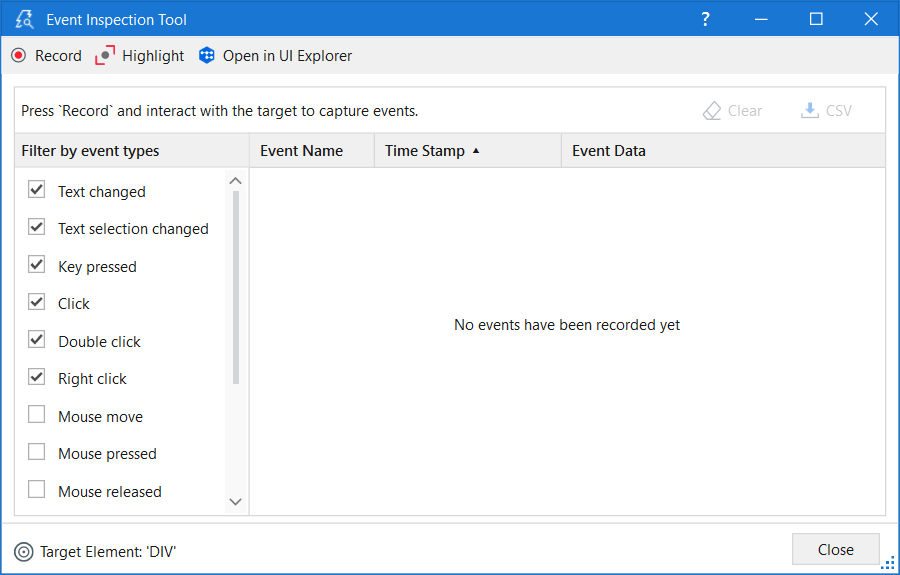
The toolbar consists of the following options:
- Record - The events generated by interacting with the UI element are recorded and added to the events list.
- Pause - The events generated by the UI element when you interact with it are no longer recorded.
- Highlight - Shows the contour of the target element and brings it to the foreground for a few seconds. The highlight stays on until it is disabled.
- Open in UI Explorer - The monitored element is opened in UI Explorer where you can observe the selector of that element.
Once you start event recording, two more options become available:
- Clear - Deletes all the recorded events.
- CSV - The captured events can be exported to a
.csvfile for further analysis.
The Event Inspection Tool window has two main sections:
- Event filter - Allows selecting the types of events you want to monitor for the target element.
- Event list - Displays information about captured events.
You can filter event types to be captured by enabling or disabling the checkboxes from the list of event types. The list may vary based on the selected element technology.
All mouse event types (Mouse move, Mouse pressed, Mouse released, Mouse entered, Mouse exited), specific for Web or Java UI elements, are disabled by default because the event list, in such cases, can become quite large. Our recommendation is to enable the mouse event types only if you have a specific need to monitor them.
It is worth also mentioning that event types can be enabled or disabled even after you started the event recording.
The event list has three columns:
- Event Name - The event type.
- Time Stamp - The date and hour when the event was performed.
- Event Data - The associated data and parameters for a certain event.
Each column can be sorted in ascending or descending order. The events are displayed by default in the order they were performed.

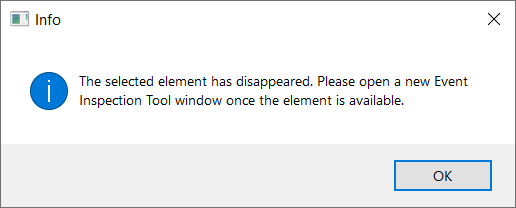
When the Disappeared event type is found, you can no longer continue monitoring and an error message is displayed on the screen. When clicking any option from the toolbar, the same error message is displayed on the screen. The only available options are to either clear the data or export it to a .csv file. To start monitoring again, close the window and open another instance of the Event Inspection Tool.
- Description
- Project compatibility
- Windows - Legacy, Windows configuration
- Native events
- About
- WND events - Top-level window
- CTRL or WND events - UI elements
- JAVA events - UI elements
- WEBCTRL events - UI elements
- HTML events - UI elements
- UIA events - UI elements
- TriggerEventArgs properties
- Event Inspection Tool


