
- Démarrage
- Meilleures pratiques
- Modélisation de l'organisation dans Orchestrator
- Gestion de grands déploiements
- Meilleures pratiques d'automatisation
- Optimisation de l'infrastructure Unattended à l'aide de modèles de machine
- Organisation des ressources avec des balises
- Réplica Orchestrator en lecture seule
- Exportation des grilles dans l'arrière-plan
- Locataire
- À propos du contexte du locataire
- Recherche de ressources dans un locataire
- Gestion des Robots
- Connexion des Robots à Orchestrator
- Enregistrement des identifiants du Robot dans CyberArk
- Stockage des mots de passe de l’Unattended Robot dans Azure Key Vault (lecture seule)
- Stockage des informations d’identification de l’Unattended Robot dans HashiCorp Vault (lecture seule)
- Stockage des informations d'identification du robot Unattended dans AWS Secrets Manager (lecture seule)
- Suppression des sessions Unattended déconnectées et qui ne répondent pas
- Authentification du Robot
- Authentification du Robot avec les informations d'identification du client
- Authentification par carte à puce
- Audit
- Paramètres - Niveau du locataire
- Service de catalogue de ressources
- Contexte des dossiers
- Automatisations
- Processus (Processes)
- Tâches (Jobs)
- Déclencheurs (Triggers)
- Journaux (Logs)
- Surveillance
- Files d'attente (Queues)
- Actifs
- Compartiments de stockage
- Tests d'Orchestrator
- Autres configurations
- Intégrations
- Robots classiques
- Administration de l'hôte
- À propos du niveau de l’hôte
- Gestion des administrateurs système
- Gestion des locataires
- Configuration des notifications par e-mail du système
- Journaux d'audit pour le portail hôte
- Mode de Maintenance
- Administration de l'organisation
- Résolution des problèmes
Exemples de configurations
Cette page décrit un mappage entre divers scénarios réels et la configuration d'Orchestrator correspondante pour les dossiers classiques.
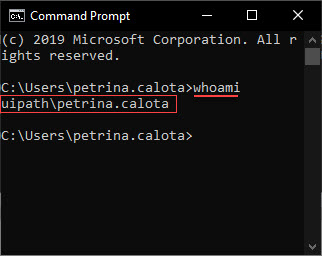
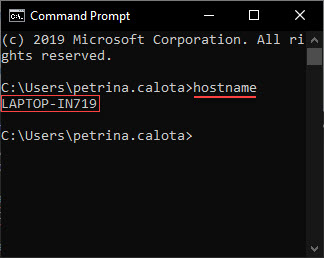
Avant d'effectuer le mappage, consultez la section sur la recherche du nom d'utilisateur (et du domaine, le cas échéant) avec lequel vous êtes connecté à votre machine, et sur la recherche du nom de la machine.
| Rechercher du nom d’utilisateur | Recherche du nom de la machine |
|---|---|
|
Pour afficher le domaine et le nom d’utilisateur, effectuez les étapes suivantes :
|
Pour afficher le nom de la machine, effectuez les étapes suivantes :
|

Dans les dossiers classiques, vous ne pouvez configurer que des configurations flottantes de type Attended. Pour les configurations flottantes Unattended, migrez vers des dossiers modernes.
Scénarios illustratifs
1 combinaison utilisateur/machine
John a reçu un ordinateur portable de l’entreprise pour laquelle il travaille et qu'il utilise chaque jour.
Il se connecte sur son ordinateur portable à l’aide de ses informations d’identification.
L’identificateur unique (nom de la machine) de l’ordinateur portable est JOSMITH.
| Configuration réelle |
|---|
| 1 utilisateur 1 machine 1 combinaison utilisateur/machine : reste identique jour après jour. |
| Configuration flottante Orchestrator |
|---|
| One machine template. Its name is not relevant. One floating robot for the user. The robot is identified by John (using the domain\username syntax).John connecte son Robot UiPath à Orchestrator à l'aide de la clé générée par le modèle de machine. |
| Configuration standard Orchestrator |
|---|
| One standard machine defined using the exact name of John's workstation, namely JOSMITH. One standard robot for the user/machine combination. The robot is identified by John (using the domain\username syntax), and John's machine (using the standard machine entity created above).John connects his UiPath Robot to Orchestrator using the key generated by the standard machine named JOSMITH. |
2 combinaisons utilisateur/machine
Boris et Vadim sont opérateurs dans un centre d’appels. Ils ne font pas les mêmes horaires et travaillent sur le même ordinateur.
Chacun se connecte à l'ordinateur à l'aide de ses informations d’identification.
L’identificateur unique de l’ordinateur portable est PC345.
| Configuration réelle |
|---|
| 2 utilisateurs 1 machine 2 combinaisons utilisateur/machine : reste identique jour après jour : {(Boris - PC345), (Vadim - PC345) |
| Configuration flottante Orchestrator |
|---|
| One machine template. Its name is not relevant. Two floating robots. Vadim et Boris connectent leurs Robots UiPath à Orchestrator à l'aide de la clé générée par le modèle de machine. |
| Configuration standard Orchestrator |
|---|
|
One standard machine defined using the exact name of the workstation, namely PC345. Two standard robots, one for each user/machine combination.
Both Vadim and Boris connect their UiPath Robots to Orchestrator using the key generated by the standard machine named PC345. Each standard robot needs to be defined using the respective standard machine. To retain the Type and Machine fields while creating the robots, enable the Create Another check box. Alternatively, for an already existing robot click More Actions > Duplicate. |
3 combinaisons utilisateur/machine
Randy, Kanye et Juanita travaillent sur des machines virtuelles, sur des images de bureau virtuelles persistantes livrées sur leurs périphériques de point de terminaison grâce à un réseau. Chacun d’eux utilise la même MV chaque jour.
Chacun se connecte aux machines virtuelles à l'aide de ses informations d’identification.
The unique identifiers of the VMs are: RAND32,KAN43 and JUA65
| Configuration réelle |
|---|
| 3 utilisateurs 3 machines 3 user/machine combination which stay the same day after day: {(Randy - RAND32), (Kanye - KAN43), (Juanita - JUA65) |
| Configuration flottante Orchestrator |
|---|
| One machine template. Its name is not relevant. Three floating robots. Chaque utilisateur connecte ses Robots UiPath à Orchestrator à l'aide de la clé générée par le même modèle de machine. |
| Configuration standard Orchestrator |
|---|
|
Three standard machines defined using the exact name of the workstations, namely RAND32,KAN43 and JUA65. Three standard robots, each for one user/machine combination.
Chaque utilisateur connecte ses Robots UiPath à Orchestrator à l'aide de la clé générée par la machine standard portant le même nom que leur station de travail. Each standard robot needs to be defined using the respective standard machine. To retain the Type and Machine fields while creating the robots, enable the Create Another check box. Alternatively, for an already existing robot click More Actions > Duplicate. |
9 combinaisons utilisateur/machine
Ion, Sandu et Georgeta travaillent sur des machines virtuelles, sur des images de bureau virtuelles non persistantes livrées sur leurs appareils de point de terminaison grâce à un réseau. Chaque jour, une MV issue d'un pool de 3 MV leur est arbitrairement affectée.
Chacun se connecte aux machines virtuelles à l'aide de ses informations d’identification.
The unique identifiers of the VMs are: VM10,VM11,VM12.
| Configuration réelle |
|---|
| 3 utilisateurs 3 machines 9 user/machine combinations which are random {(Ion - VM10), (Ion - VM11), (Ion - VM12), (Sandu - VM10), (Sandu - VM11), (Sandu - VM12), (Georgeta - VM10), (Georgeta - VM11), (Georgeta - VM12) |
| Configuration flottante Orchestrator |
|---|
| One machine template. Its name is not relevant. Three floating robots. Chaque utilisateur connecte ses Robots UiPath à Orchestrator à l'aide de la clé générée par le même modèle de machine. |
| Configuration standard Orchestrator |
|---|
|
Three standard machines defined using the exact name of the workstations, namely VM10,VM11,VM12. Nine standard robots, each for one user/machine combination.
Chaque utilisateur connecte ses Robots UiPath à Orchestrator à l'aide de la clé générée par la machine standard portant le même nom que leur VM. Each standard robot needs to be defined using the respective standard machine. To retain the Type and Machine fields while creating the robots, enable the Create Another check box. Alternatively, for an already existing robot click More Actions > Duplicate. |