
设置示例
本页描述了几种现实场景与在传统文件夹中完成的相应 Orchestrator 设置之间的映射。
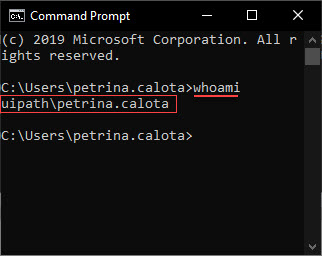
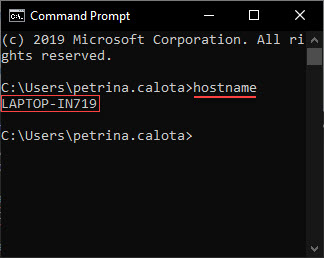
在进行映射之前,请先阅读如何查找用于登录计算机的用户名(如果有的话,还包括域),以及如何查找计算机本身的名称。
| 查找用户名 | 查找计算机名称 |
|---|---|
|
要显示域和用户名,请按照以下步骤操作:
|
要显示计算机名称,请执行以下步骤:
|

在传统文件夹中,您只能配置有人值守的浮动设置。对于无人值守的浮动设置,请迁移到新式文件夹。
说明性场景
1 个用户/计算机组合
John 所在的公司为他提供了一台笔记本电脑,他每天都在该笔记本电脑上工作。
他使用自己的凭据登录笔记本电脑。
便携式计算机的唯一标识符(计算机名称)为 JOSMITH。
| 现实生活中的设置 |
|---|
| 1 位使用者 1 台计算机 1 个用户/计算机组合 - 始终保持不变。 |
| Orchestrator 浮动设置 |
|---|
| One machine template. Its name is not relevant. One floating robot for the user. The robot is identified by John (using the domain\username syntax).John 使用计算机模板生成的密钥将其 UiPath 机器人连接到 Orchestrator。 |
| Orchestrator 标准设置 |
|---|
| One standard machine defined using the exact name of John's workstation, namely JOSMITH. One standard robot for the user/machine combination. The robot is identified by John (using the domain\username syntax), and John's machine (using the standard machine entity created above).John connects his UiPath Robot to Orchestrator using the key generated by the standard machine named JOSMITH. |
2 个用户/计算机组合
Boris 和 Vadim 是呼叫中心接线员。他们在同一台计算机上按两班制工作。
他们每个人都使用其凭据登录计算机。
笔记本电脑的唯一标识符是 PC345。
| 现实生活中的设置 |
|---|
| 2 位使用者 1 台计算机 2 个用户/计算机组合 - 始终保持不变:{(Boris - PC345), (Vadim - PC345)} |
| Orchestrator 浮动设置 |
|---|
| One machine template. Its name is not relevant. Two floating robots. Vadim 和 Boris 都使用计算机模板生成的密钥将其 UiPath 机器人连接到 Orchestrator。 |
| Orchestrator 标准设置 |
|---|
|
One standard machine defined using the exact name of the workstation, namely PC345. Two standard robots, one for each user/machine combination.
Both Vadim and Boris connect their UiPath Robots to Orchestrator using the key generated by the standard machine named PC345. Each standard robot needs to be defined using the respective standard machine. To retain the Type and Machine fields while creating the robots, enable the Create Another check box. Alternatively, for an already existing robot click More Actions > Duplicate. |
3 个用户/计算机组合
Randy、Kanye 和 Juanita 在虚拟机上工作,在持久性虚拟桌面映像上工作,这些映像通过网络传送到其端点设备。他们每个人每天都使用相同的 VM。
他们每个人都使用其凭据登录虚拟机。
The unique identifiers of the VMs are: RAND32,KAN43 and JUA65.
| 现实生活中的设置 |
|---|
| 3 名用户 3 台计算机 3 user/machine combination which stay the same day after day: {(Randy - RAND32), (Kanye - KAN43), (Juanita - JUA65) |
| Orchestrator 浮动设置 |
|---|
| One machine template. Its name is not relevant. Three floating robots. 每个用户使用同一个计算机模板生成的密钥将其 UiPath 机器人连接到 Orchestrator。 |
| Orchestrator 标准设置 |
|---|
|
Three standard machines defined using the exact name of the workstations, namely RAND32,KAN43 and JUA65. Three standard robots, each for one user/machine combination.
每个用户都使用标准计算机(名称与工作站相同)生成的密钥将其 UiPath 机器人连接到 Orchestrator。 Each standard robot needs to be defined using the respective standard machine. To retain the Type and Machine fields while creating the robots, enable the Create Another check box. Alternatively, for an already existing robot click More Actions > Duplicate. |
9 个用户/计算机组合
Ion、Sandu 和 Georgeta 在虚拟机上工作,在非持久性虚拟桌面映像上工作,这些映像通过网络传送到其端点设备。每天,他们从池中的 3 个 VM 中任意分配到一个 VM。
他们每个人都使用其凭据登录虚拟机。
The unique identifiers of the VMs are: VM10,VM11,VM12.
| 现实生活中的设置 |
|---|
| 3 名用户 3 台计算机 9 个随机用户/计算机组合 {{(Ion - VM10), (Ion - VM11), (Ion - VM12), (Sandu - VM10), (Sandu - VM11), (Sandu - VM12), (Georgeta - VM10), (Georgeta - VM11), (Georgeta - VM12)}} |
| Orchestrator 浮动设置 |
|---|
| One machine template. Its name is not relevant. Three floating robots. 每个用户使用同一个计算机模板生成的密钥将其 UiPath 机器人连接到 Orchestrator。 |
| Orchestrator 标准设置 |
|---|
|
Three standard machines defined using the exact name of the workstations, namely VM10,VM11,VM12. Nine standard robots, each for one user/machine combination.
每个用户都使用标准计算机(名称与虚拟机相同)生成的密钥将其 UiPath 机器人连接到 Orchestrator。 Each standard robot needs to be defined using the respective standard machine. To retain the Type and Machine fields while creating the robots, enable the Create Another check box. Alternatively, for an already existing robot click More Actions > Duplicate. |