
- 概述
- Document Understanding 流程
- 快速入门教程
- 框架组件
- ML 包
- 概述
- Document Understanding - ML 包
- DocumentClassifier - ML 包
- 具有 OCR 功能的 ML 包
- 1040 - ML 包
- 1040 附表 C - ML 包
- 1040 附表 D - ML 包
- 1040 附表 E - ML 包
- 1040x - ML 包
- 3949a - ML 包
- 4506T - ML 包
- 709 - ML 包
- 941x - ML 包
- 9465 - ML 包
- 990 - ML 包 - 预览
- ACORD125 - ML 包
- ACORD126 - ML 包
- ACORD131 - ML 包
- ACORD140 - ML 包
- ACORD25 - ML 包
- 银行对账单 - ML 包
- 提单 - ML 包
- 公司注册证书 - ML 包
- 原产地证书 - ML 包
- 检查 - ML 包
- 儿童产品证书 - ML 包
- CMS1500 - ML 包
- 欧盟符合性声明 - ML 包
- 财务报表 (Financial statements) - ML 包
- FM1003 - ML 包
- I9 - ML 包
- ID Cards - ML 包
- Invoices - ML 包
- 中国发票 - ML 包
- 希伯来语发票 - ML 包
- 印度发票 - ML 包
- 日本发票 - ML 包
- 装运发票 - ML 包
- 装箱单 - ML 包
- 护照 - ML 包
- 工资单 - ML 包
- 采购订单 - ML 包
- 收据 - ML 包
- 汇款通知书 - ML 包
- UB04 - ML 包
- 水电费账单 - ML 包
- 车辆所有权证明 - ML 包
- W2 - ML 包
- W9 - ML 包
- 其他开箱即用的 ML 包
- 公共端点
- 硬件要求
- 管道
- Document Manager
- OCR 服务
- 支持的语言
- 深度学习
- Insights 仪表板
- 部署在 Automation Suite 中的 Document Understanding
- 在 AI Center 独立版中部署的 Document Understanding
- 许可
- Activities (活动)
- UiPath.Abbyy.Activities
- UiPath.AbbyyEmbedded.Activities
- UiPath.DocumentProcessing.Contracts
- UiPath.DocumentUnderstanding.ML.Activities
- UiPath.DocumentUnderstanding.OCR.LocalServer.Activities
- UiPath.Intelligent OCR.Activities
- UiPath.OCR.Activities
- UiPath.OCR.Contracts
- UiPath.OmniPage.Activities
- UiPath.PDF.Activities


Document Understanding 用户指南
评估管道
评估管道用于评估经过训练的 ML 模型。
评估经过训练的模型
按如下方式配置评估管道:
-
在“管道类型”字段中,选择“评估运行”。
-
In the Choose package field, select the package you want to evaluate.
-
In the Choose package major version field, select a major version for your package.
-
In the Choose package minor version field, select a minor version you want to evaluate.
-
In the Choose evaluation dataset field, select a representative evaluation dataset.
-
In the Enter parameters section, there is one environment variable is relevant for Evaluation pipelines you could use:
-
eval.redo_ocr,如果设置为 true,则允许您在运行管道时重新运行 OCR,以评估 OCR 对提取准确性的影响。这假设创建 ML 包时已配置 OCR 引擎。 -
The Enable GPU slider is disabled by default, in which case the pipeline is runs on CPU. We strongly recommend that Evaluation pipelines run only on CPU.
-
Select one of the options when the pipeline should run: Run now, Time based or Recurring.
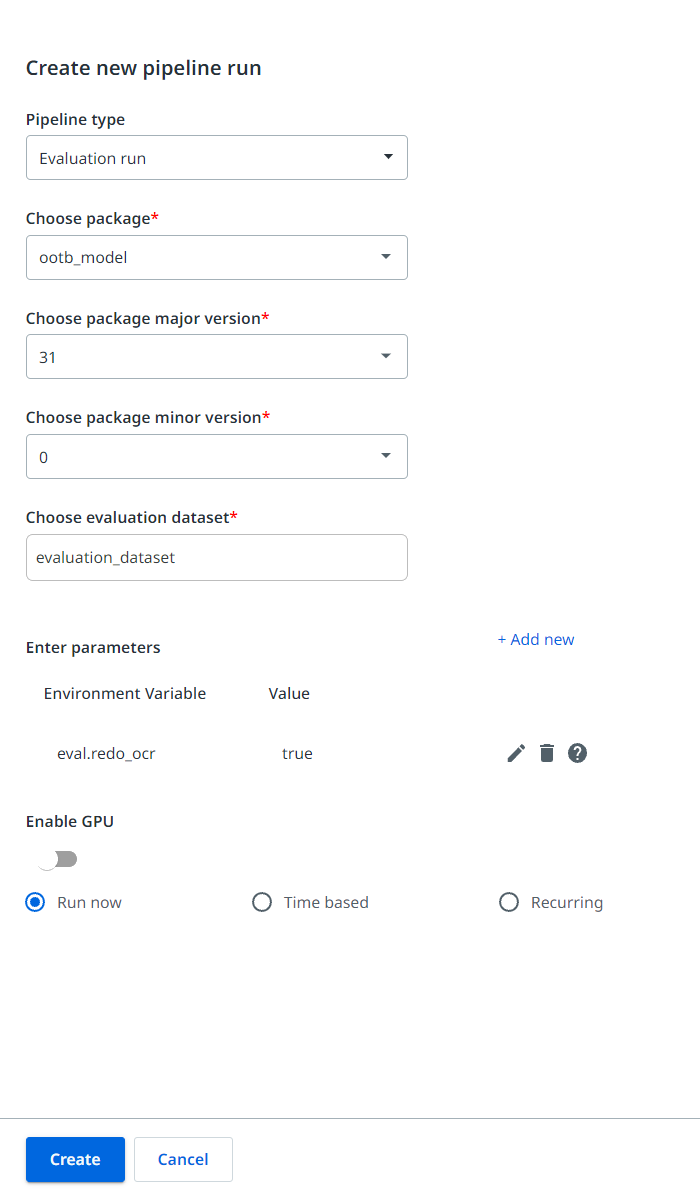
After you configure all the fields, select Create. The pipeline is created.
工件
对于评估管道,“输出”窗格还包括“artifacts”/“eval_metrics”文件夹,其中包含两个文件:
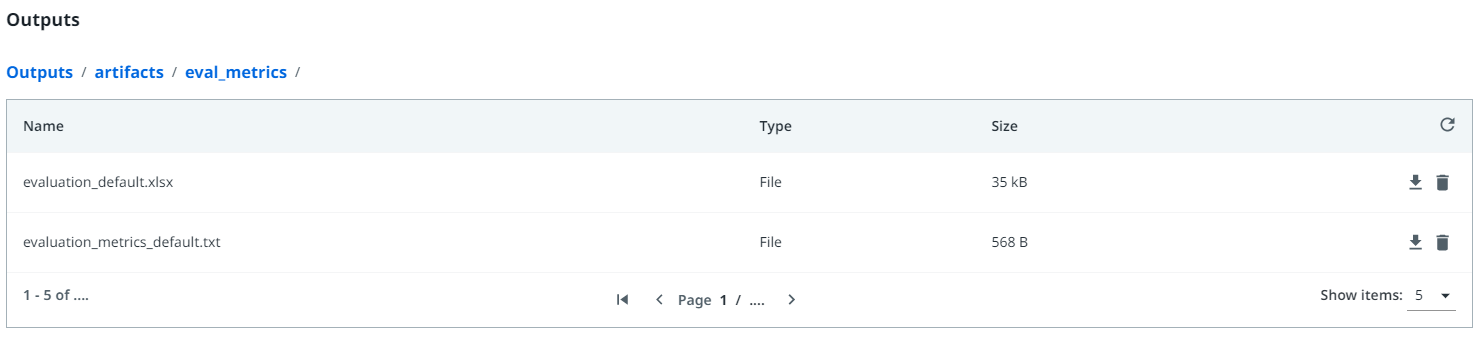
evaluation_default.xlsx是包含三个不同工作表的 Excel 电子表格:- 第一个工作表列出了每个字段(“常规”、“列”和“分类”)的总体分数和每批分数的摘要。还提供了每批文档和整个文档的提取文档的百分比。
- 第二张工作表并排显示常规字段的颜色编码比较,以提高文档准确性。最不准确的文档会显示在顶部,以便于诊断和故障排除。
- The third sheet presents a side by side color, coded comparison of the Column Fields. All scores presented in the Excel file represent accuracy scores.
evaluation_metrics_default.txt包含预测字段的 F1 分数。