
- Primeros pasos
- Mejores prácticas
- Tenant
- Acerca del contexto de tenant
- Buscar recursos en un tenant
- Gestionar robots
- Conexión de los robots a Orchestrator
- Almacenar credenciales de robots en CyberArk
- Almacenamiento de contraseñas de robot desatendido en Azure Key Vault (solo lectura)
- Almacenar las credenciales de robots desatendidos en HashiCorp Vault (solo lectura)
- Eliminar sesiones desconectadas y sin respuesta no atendidas
- Autenticación de Robot
- Autenticación de robots con credenciales de cliente
- Autenticación por SmartCard
- Asignar roles
- Gestionar roles
- Roles por defecto
- Preguntas frecuentes
- Habilitación de usuarios para ejecutar automatizaciones personales
- Habilitación de usuarios para ejecutar automatizaciones en infraestructura desatendida por medio de robots desatendidos
- Configuración de cuentas de robot para ejecutar automatizaciones desatendidas
- Auditoría
- Servicio de catálogo de recursos
- Contexto de carpetas
- Automatizaciones
- Procesos
- Trabajos
- Desencadenadores
- Registros
- Supervisión
- Colas
- Activos
- Depósitos de almacenamiento
- Pruebas de Orchestrator
- Integraciones
- Robots clásicos
- Gestionar robots
- Estados de los robots
- Ejemplos de configuración
- Trabajos
- Desencadenadores
- Recursos
- Solución de problemas
Ejemplos de configuración
Esta página describe una asignación entre un par de escenarios de vida real y la configuración correspondiente de Orchestrator realizado en carpetas clásicas.
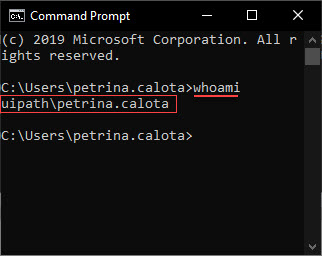
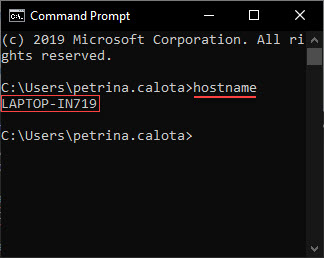
Antes de asignar, lee primero cómo encontrar el nombre de usuario (y el dominio si es el caso) que has iniciado en tu máquina y cómo encontrar el propio máquina de la máquina.
| Encontrar el nombre de usuario | Buscar el nombre de la máquina |
|---|---|
|
Para mostrar el dominio y el nombre de usuario, sigue los siguientes pasos:
|
Para mostrar el nombre de la máquina, sigue los siguientes pasos:
|

En las carpetas clásicas, solo puedes configurar las configuraciones flotantes de tipo atendido. Para las configuraciones flotantes no atendidos, migrará las carpetas modernas.
Situaciones ilustrativas
1 Combinación Usuario/Máquina
A John la empresa para la que trabaja le proporciona un portátil en el que trabaja todos los días.
Inicia sesión en su portátil con sus credenciales.
El identificador único (nombre de la máquina) del portátil es JOSMITH.
| Configuración de la vida real |
|---|
| 1 usuario 1 Máquina 1 combinación usuario/máquina: se mantiene igual día tras día. |
| Configuración flotante de Orchestrator |
|---|
| One machine template. Its name is not relevant. One floating robot for the user. The robot is identified by John (using the domain\username syntax).John conecta su UiPath Robot a Orchestrator usando la clave generada por la plantilla de máquina. |
| Configuración estándar de Orchestrator |
|---|
| One standard machine defined using the exact name of John's workstation, namely JOSMITH. One standard robot for the user/machine combination. The robot is identified by John (using the domain\username syntax), and John's machine (using the standard machine entity created above).John connects his UiPath Robot to Orchestrator using the key generated by the standard machine named JOSMITH. |
2 Combinaciones Usuario/Máquina
Boris y Vadim trabajan de operadores de atención al cliente. Trabajan en dos turnos en el mismo ordenador.
Cada uno inicia sesión en el ordenador usando sus credenciales.
El identificador único del portátil es PC345.
| Configuración de la vida real |
|---|
| 2 Usuarios 1 Máquina 2 combinaciones de usuario/máquina: se mantienen igual día tras día: {(Boris - PC345), (Vadim - PC345)} |
| Configuración flotante de Orchestrator |
|---|
| One machine template. Its name is not relevant. Two floating robots. Tanto Vadim como Boris conectan sus UiPath Robots a Orchestrator utilizando la clave generada por la plantilla de máquina. |
| Configuración estándar de Orchestrator |
|---|
|
One standard machine defined using the exact name of the workstation, namely PC345. Two standard robots, one for each user/machine combination.
Both Vadim and Boris connect their UiPath Robots to Orchestrator using the key generated by the standard machine named PC345. Each standard robot needs to be defined using the respective standard machine. To retain the Type and Machine fields while creating the robots, enable the Create Another check box. Alternatively, for an already existing robot click More Actions > Duplicate. |
3 Combinaciones Usuario/Máquina
Randy, Kanye y Juanita trabajan en máquinas virtuales, en imágenes persistentes de escritorios virtuales que se entregan a sus terminales mediante una red. Cada uno de ellos usa la misma MV todos los días.
Cada uno de ellos inicia sesión en la MV usando sus credenciales.
The unique identifiers of the VMs are: RAND32,KAN43 and JUA65.
| Configuración de la vida real |
|---|
| 3 Usuarios 3 Máquinas 3 user/machine combination which stay the same day after day: {(Randy - RAND32), (Kanye - KAN43), (Juanita - JUA65) |
| Configuración flotante de Orchestrator |
|---|
| One machine template. Its name is not relevant. Three floating robots. Cada usuario conecta sus UiPath Robots a Orchestrator usando la clave generada por la misma plantilla de máquina. |
| Configuración estándar de Orchestrator |
|---|
|
Three standard machines defined using the exact name of the workstations, namely RAND32,KAN43 and JUA65. Three standard robots, each for one user/machine combination.
Cada usuario conecta sus Robots de UiPath a Orchestrator utilizando la clave generada por la máquina estándar con el mismo nombre que su estación de trabajo. Each standard robot needs to be defined using the respective standard machine. To retain the Type and Machine fields while creating the robots, enable the Create Another check box. Alternatively, for an already existing robot click More Actions > Duplicate. |
9 Combinaciones Usuario/Máquina
Ion, Sandu y Georgeta trabajan en máquinas virtuales, en imágenes no persistentes de escritorios virtuales que se entregan a sus terminales mediante una red. Cada día se les asigna aleatoriamente una MV de un grupo de 3 MV.
Cada uno de ellos inicia sesión en la MV usando sus credenciales.
The unique identifiers of the VMs are: VM10,VM11,VM12.
| Configuración de la vida real |
|---|
| 3 Usuarios 3 Máquinas 9 combinaciones usuario/máquina que son aleatorias {(Ion - VM10), (Ion - VM11), (Ion - VM12), (Sandu - VM10), (Sandu - VM11), (Sandu - VM12), (Georgeta - VM10), (Georgeta - VM11), (Georgeta - VM12)} |
| Configuración flotante de Orchestrator |
|---|
| One machine template. Its name is not relevant. Three floating robots. Cada usuario conecta sus UiPath Robots a Orchestrator usando la clave generada por la misma plantilla de máquina. |
| Configuración estándar de Orchestrator |
|---|
|
Three standard machines defined using the exact name of the workstations, namely VM10,VM11,VM12. Nine standard robots, each for one user/machine combination.
Cada usuario conecta sus UiPath Robots a Orchestrator utilizando la clave generada por la máquina estándar con el mismo nombre que su VM. Each standard robot needs to be defined using the respective standard machine. To retain the Type and Machine fields while creating the robots, enable the Create Another check box. Alternatively, for an already existing robot click More Actions > Duplicate. |