
apps
latest
false
Apps 用户指南
- 入门指南
- 演示应用程序
- 如何
- 通知
- 使用 VB 表达式
- 设计应用程序
- 使用 Autopilot 设计应用程序
- 事件和规则
- 在应用程序中利用 RPA
- 在应用程序中利用实体
- 在应用程序中利用队列
- 在应用程序中利用媒体文件
- 在应用程序中利用操作
- 在应用程序中利用 Connections
- Studio Web 中的应用程序
- 应用程序生命周期管理 (ALM)
- UiPath 第一方应用程序
- 基本故障排除指南
重要 :
有关 Studio Web 中的应用程序项目文档,请参阅 Studio Web 文档中的“应用程序项目”一章:https://docs.uipath.com/zh-CN/studio-web/automation-cloud/latest/user-guide/apps-in-studio-web。
请注意,此内容已使用机器翻译进行了部分本地化。
新发布内容的本地化可能需要 1-2 周的时间才能完成。
替换流程
将应用程序中引用的流程替换为另一个流程,在开发、测试和生产环境之间移动应用程序时非常有用。
Apps Studio 允许替换应用程序中引用的流程。当您在组织或环境(开发、测试和生产)之间移动应用程序时,此功能很实用。
备注:
如果刷新或替换其参数绑定到一个或多个控件的流程,则:
- 不会从流程定义中删除流程参数。
- 流程数据类型未修改。
此行为仅适用于复杂的数据类型子属性,例如数据表中的列或 .NET 对象的属性。
要将一个流程替换为另一个流程,请执行以下操作:
-
在树视图中,右键单击要替换的流程,然后选择“替换”。 更改租户时,先前引用的流程将不可用,并且会被标记为错误。
-
系统将打开流程替换向导。要从其他租户中选择流程,请单击“选取其他租户” 。
备注:更改租户将导致该租户中托管的任何资源不可用。这些资源以及使用它们的控件会被标记为错误。
-
在左侧面板中,通过选中流程名称旁边的复选框来选择所需的流程。所选流程详细信息的列表将显示在右侧面板中。
-
选择流程后,您可以在右侧窗格中查看流程详细信息。
新旧流程参数之间的差异用两个图标表示:
| | | | --- | --- | | A yellow plus icon | The argument exists only in the new process that replaces the old one. | | A red minus icon | The argument exists only in the old process that is being replaced. | 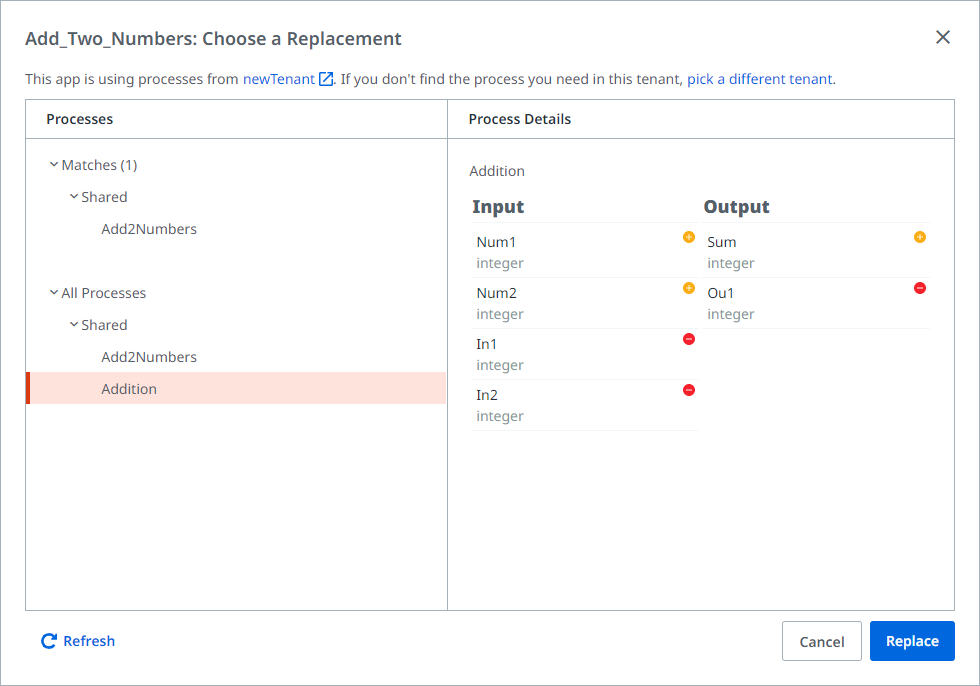 | | | | --- | --- | | A yellow plus icon | The argument exists only in the new process that replaces the old one. | | A red minus icon | The argument exists only in the old process that is being replaced. |   -
单击“替换”以将现有流程替换为所选的新队列。
重要提示:您无法撤销对流程的替换。 替换已删除参数的流程可能会导致应用程序中的绑定失效。