# February 2023
> We are pleased to announce the release of **UiPath Test Manager Connect**, a powerful connector offered by **Planview ®** that facilitates seamless integration between Test Manager and a wide variety of third-party ALM (Application Lifecycle Management) tools through **Planview Tasktop Hub**. This allows easier integration with any of the tools listed in the **Planview Tasktop Hub**, streamlining workflows and increasing efficiency.
## 14 February 2023
## What's New
### UiPath Test Manager Connect
We are pleased to announce the release of **UiPath Test Manager Connect**, a powerful connector offered by **Planview ®** that facilitates seamless integration between Test Manager and a wide variety of third-party ALM (Application Lifecycle Management) tools through **Planview Tasktop Hub**. This allows easier integration with any of the tools listed in the **Planview Tasktop Hub**, streamlining workflows and increasing efficiency.
For more details about enabling and working with **UiPath Test Manager Connect**, see [our documentation](https://docs.uipath.com/test-suite/automation-cloud/latest/user-guide/uipath-test-manager-connect) and the [Planview documentation](https://docs.tasktop.com/premium/connector-documentation/uipath-test-manager).
## 7 February 2023
## Improvements
## Automation information
Importing projects into Test Manager now becomes easier with information about the automations that generated the imported test cases!
To easily search test cases generated by the same automation when you import a project, select **Include automation information for test cases** in the **Import project** page. This adds a custom field for each test case that displays the information about the automation that generated it.
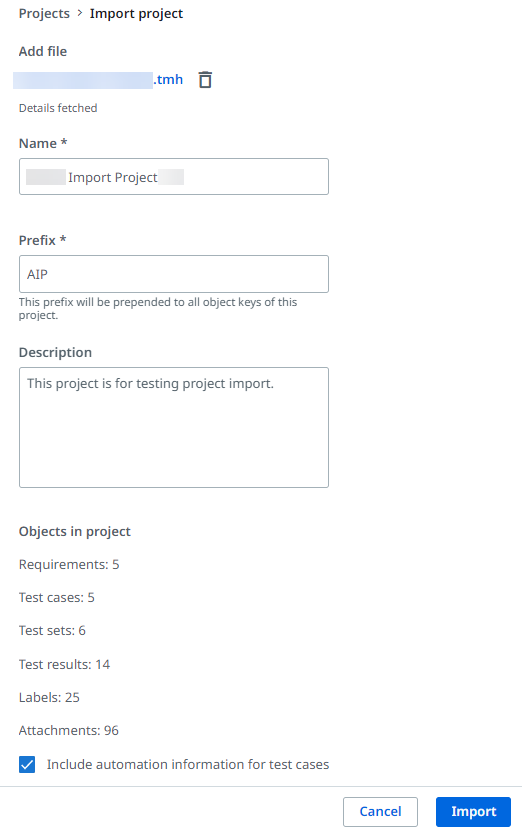
After the project import is finished, you can filter the test cases that were generated by the same automation, using the **automationcleared** label filter. Information about the automation that generated a specific test case is displayed in the **Details** tab of the test case.
Check out the [Import Project](https://docs.uipath.com/test-suite/automation-cloud/latest/user-guide/import-project) page for more details.
## Test Case version
The **Version** field in the **Execution and robot details** section of an executed test case shows the version of the Orchestrator package that executed it.

## 1 February 2022
## Bug fixes
Fixed a bug that prevented new Jira and XRay Cloud integrations from being saved.
## Deprecation timeline
We recommend that you regularly check the [deprecation timeline](https://docs.uipath.com/overview/other/latest/overview/deprecation-timeline#Test%20Manager) for any updates regarding features that will be deprecated and removed.