# Audit
> The **Audit** page displays the audit trail for actions performed by all entities in Orchestrator.
The **Audit** page displays the audit trail for actions performed by all entities in Orchestrator.
## Filtering the Events in the Audit Page
The data in the **Audit** page can be filtered by several criteria, namely **Component**,**User**,**Action**, and **Time**:
### Component
The **Component** filter displays the logs based on the component that performed a given action in the system.
Available **Component** filters:
* All
* Actions
* Assets
* Buckets
* Comments
* Credential Stores
* Credentials Proxies
* Directory Service
* Environments
* Execution Media
* Folders
* Jobs
* Libraries
* Licenses
* Machines
* Maintenance
* Monitoring
* Packages
* Personal Workspaces
* Processes
* Queues
* Robots
* Roles
* Settings
* Sessions
* Triggers
* Units
* Users
* Webhooks
### User
The **User** filter enables viewing changes performed by a certain user.
### Action
The **Action** filter displays the logs based on the type of action that was executed.
Available **Action** filters:
* All
* Acknowledge
* Activate
* Assign
* Associate
* Bulk Upload
* Changed Password
* Change Status
* Convert
* Create
* Deactivate
* Delete
* Download
* End
* Explore End
* Explore Start
* Import
* Move
* Password Reset Attempt
* Reset Password
* Skip
* Start
* Start delete
* Start Job
* Stop Job
* Toggle
* Unassign
* Update
* Upload
### Time
The **Time** filter makes it possible to view the events within a predefined period.
Available **Time** filters:
* All
* Last hour
* Last day
* Last week
* Last 30 days
## Exporting the Audit Page as a .CSV File
Audit logs of on-premises Orchestrator instances are retained until you perform a database maintenance or you manually delete them.
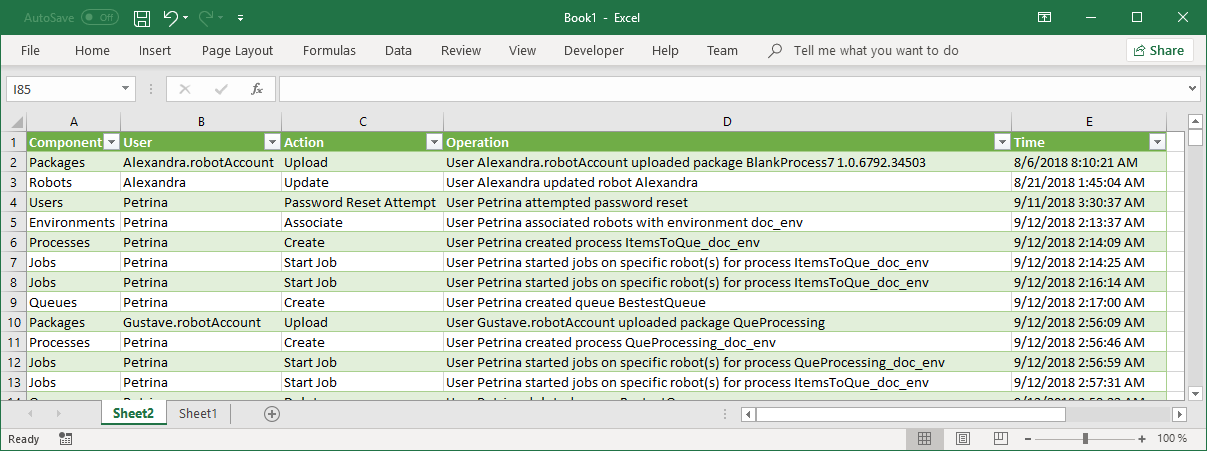
The entire information comprised in the **Audit** page can be downloaded as a `.csv` file by selecting the **Export** button.
Figure 1. CSV file
:::note
To ensure the best performance, the exported entries are in chronological order.
:::
## The Audit Data Window
Further information about an event can be displayed by clicking the **View Details** button from the right side of the **Audit** page.
:::note
“User System Administrator deactivated trigger” means that the trigger was disabled [automatically due to certain conditions being met.](https://docs.uipath.com/orchestrator/standalone/2022.10/installation-guide/uipath-orchestrator-dll-config#triggers)
:::
## Components to Actions Mapping
The table below maps each **Component** with its corresponding **Actions**, to facilitate filtering the audited events.
Components
Actions
Actions (previously Tasks)
Create
Update
Save
Forward
Assign
Unassign
Assets
Create
Update
Delete
Buckets
Create
Create storage file shared access signature
Update
Delete
Delete storage file
Comments
Create
Update
Delete
Credential Stores
Create
Update
Delete
Directory Service
Create
Update
Associate
Environments
Create
Update
Delete
Associate
Execution Media
Download
Folders (previously Units)
Create
Update
Delete
Start Delete
Move
Associate
Unassign
Toggle
Jobs
Start Job
Stop Job
Resume Job
Libraries
Upload
Delete
Licenses
Activate
Deactivate
Upload
Update
Toggle
Delete
Machines
Create
Update
Delete
Maintenance
Download
Start
End
Monitoring
Acknowledge
Packages
Upload
Delete
Personal Workspaces
Create
Activate
Deactivate
Update
Explore Start
Explore End
Convert
Delete
Processes
Create
Update
Delete
Queues
Create
Update
Delete
Bulk Upload
Robots
Create
Update
Delete
Change Status
Roles
Create
Update
Delete
Associate
Toggle
Settings
Create
Update
Delete
Sessions
Delete
Triggers
Create
Update
Delete
Activate
Deactivate
Change Status
Users
Create
Update
Delete
Import
Associate
Change Status
Change Password
Password Reset Attempt
Reset Password
Webhooks
Create
Update
Delete
## Test Automation Components to Actions Mapping
The following table maps **Components** to corresponding **Actions**, so you can filter by operations.
Components
Actions
Test Sets
Create
Update
Delete
Test Set Schedules
Create
Update
Delete
Enabled / Disabled
Test Set Executions
Trigger
Cancel
Test Data Queues
Add / Bulk Add
Delete / Delete All
Consume / Unconsume
Consume / Unconsume All