# Listing details
> This is the first step of the listing submission process.
This is the first step of the listing submission process.
Please fill in all the necessary fields.
## 1. Monetization Type
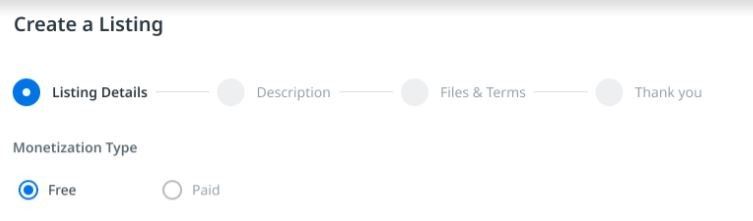
Solution Accelerators can be submitted **only** as Free.
## 2. Listing Language
Select the language from the drop-down menu. Please note that the platform currently supports only English and Japanese languages.
## 3. Listing Type

Please select from the dropdown menu one of the available options that is applicable in your case:
| N/A | N/A |
| --- | --- |
| **Content Type** | **Description** |
| **Downloadable** | This type of Content can be downloaded directly from UiPath Marketplace. |
## 4. Category, industry and line of business
Please select from the dropdown menu one of the available options that is applicable in your case:
| N/A | N/A |
| --- | --- |
| **Category** | Accelerator |
| **Industry** | Select the Appropriate Industry |
| **Line of Business** | Select the Appropriate Line of Business |
## 5. Compatibility
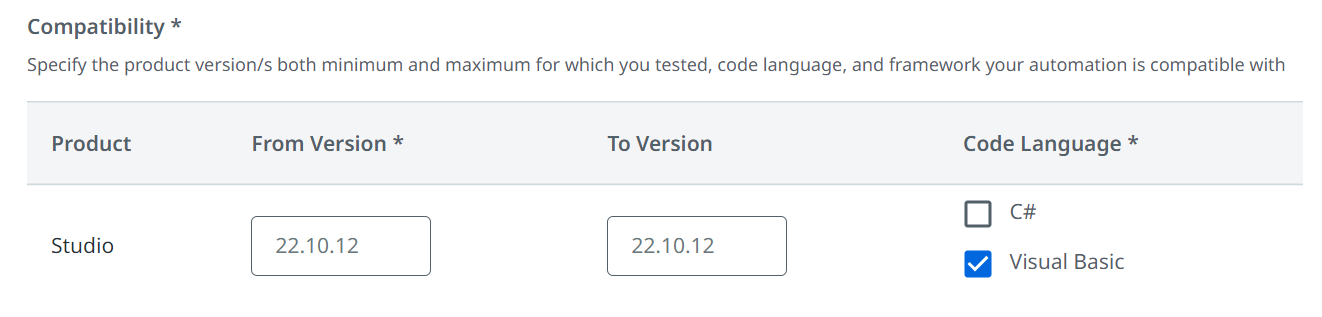
Specify the Studio version(s) and code language your automation is compatible with.
a. **Version** - mention the version(s) of the corresponding product that is compatible with your listing. If it was not tested on multiple versions, enter the version it was created **E.g. UiPath Studio 22.10 to 24.04.**
b. **Code Language** - select the code language your listing is compatible with: C# and/or Visual Basic.
:::note
Choosing C# will automatically check Visual basic too. Alternatively, you can only choose Visual Basic Language. If you select C#, Visual Basic is also selected and grayed out. To deselect Visual Basic in this case, you need to first deselect C#.
:::
## 6. Upload files
| N/A | N/A | N/A |
| --- | --- | --- |
| Listing Type | Listing File (available for download in the Marketplace) | Source Code (not available for download in the Marketplace) |
| Solution Accelerator | .zip | .zip |
### a. Upload listing file
Please drag & drop your file here or add it using the **Plus** button.
You will have to upload 2 zip folders corresponding to the existing deployment methods:
* For the traditional deployment method in which end-users will download the .zip folder locally and deploy it without Solutions Management, the .zip folder needs to contain the following:
Deployment (folder)
Asset details.xlsx
Queue details.xlsx
SQL Schemas.sql
{SAReusable}.nupgk
{SADataServiceSchema}.json
DataService{EntityUtilities}
Input
Insert Operation
Main.xaml
Main.xaml.json
project.json
Documentation (folder)
Related Documents (folder)
{SA}DetailedSolutionDesign.pdf
{SA}HighLevelSolutionDesign.pdf
ReFrameworkDocumentation.pdf
ReusableComponentsMethodology.pdf
{SA}Diagram.vsdx
{SA}TemplateExample.xlsx
{SA}AcceleratorOverview.docx
{SA}AcceleratorOverview.pdf
{SA}DeploymentGuide.docx
{SA}DeploymentGuide.pdf
{SA}TechnicalDocumentation.docx
{SA}TechnicalDocumentation.pdf
Libraries (folder)
{SA}Libraries (folder)
SQL
UiPathDataService
{SA}{Process}.xaml
project.json
Processes (folder)
DUTemplate (folder)
Data
Documentation
Framework
UserGuide
Main-ActionCenter.xaml
Main-Attended.xaml
License.txt
project.json
EmailDispatcherTemplate (folder)
Data
Documentation
Framework
Main.xaml
License.txt
project.json
PerformerTemplate (folder)
Data
Documentation
Framework
Main.xaml
License.txt
project.json
* For Solutions Management deployment, there will be 2 .zip folders that needs to uploaded and their structure is as follows:
#### 1. Solutions management assets:
Configurations (folder)
Default (folder)
configuration.json
resources.json
packageInfo.json
solutionMetadata.json
#### 2. Templates
Deployment (folder)
SQL Schemas.sql
{SADataServiceSchema}.json
DataService{EntityUtilities} (folder)
Input
Insert Operation
Main.xaml
Main.xaml.json
project.json
Documentation (folder)
Related Documents (folder)
{SA}DetailedSolutionDesign.pdf
{SA}HighLevelSolutionDesign.pdf
ReFrameworkDocumentation.pdf
ReusableComponentsMethodology.pdf
{SA}Diagram.vsdx
{SA}TemplateExample.xlsx
{SA}AcceleratorOverview.docx
{SA}AcceleratorOverview.pdf
{SA}DeploymentGuide.docx
{SA}DeploymentGuide.pdf
{SA}TechnicalDocumentation.docx
{SA}TechnicalDocumentation.pdf
Libraries (folder)
{SA}Libraries (folder)
SQL
UiPathDataService
{SA}{Process}.xaml
project.json
Processes (folder)
DUTemplate (folder)
Data
Documentation
Framework
UserGuide
Main-ActionCenter.xaml
Main-Attended.xaml
License.txt
project.json
EmailDispatcherTemplate (folder)
Data
Documentation
Framework
Main.xaml
License.txt
project.json
PerformerTemplate (folder)
Data
Documentation
Framework
Main.xaml
License.txt
project.json
| N/A | N/A |
| --- | --- |
| **Limitations to keep in mind** | N/A |
| Maximum size | 100 MB for all listings1GB for ML Models |
| Maximum upload files | 1 |
### b. Upload Source Code
Please drag & drop your source code here or add it using the **Plus** button. These are the same folders you uploaded for Listing File.
| N/A | N/A |
| --- | --- |
| **Limitations to keep in mind** | N/A |
| Maximum size | 100 MB |
| Maximum upload files | 1 |
:::note
Please make sure to upload the complete source code for testing purposes only. Marketplace Customers won't be able to download it from Marketplace.
:::
Don’t forget to click **Next** once you’ve added all the necessary information.