# Description
> This is the second step of the listing submission process. Please make sure to read the best practices described below before filling in the Upload form fields.
This is the second step of the listing submission process. Please make sure to read the best practices described below before filling in the Upload form fields.
## 1. Listing Title
(50 characters max.)
This is one of the most important listing elements. It influences your reach on the Marketplace search results and represents the initial filter for Marketplace Customers when deciding if the listing has the potential to fit their needs. Please check the below best practices to guide you when picking one:
DOs
DON’Ts
The title should have the following structure: I will do {Service} for {product/setup} ”. Examples: Invoice processing for Netsuite, Salesforce;
Marketing Social media automation for LinkedIn, Facebook, Instagram;
Cash to Order for SAP S/4HANA;
Lead collection and filtering for Salesforce
If your listing is intended for a specific region include the region abbreviation. E.g. ESP for Spain, JPN for Japan, CA for California, NY for New York, etc.
The title should not start with the name of the software/system where the listing can be used. E.g. SAP Activity
Don’t use abbreviations, generic, cryptic, or made-up words to describe your listing. E.g. Simple Data Extraction, Reliable Friend - Robot Pack
Don’t capitalize on all the title’s letters.
It is not recommended to use special characters such as: / \ : * ? “ < > [ ] & $. These are not recognized during the search. E.g. Get_Valid_Files, Am I Online?
## 2. Icon/Logo
In this section, you can upload a custom image to be displayed on your listing’s card. The image needs to be representative of your listing’s main idea and should contain simple symbols. On this spot, you can also add your company logo. If you don’t add the listing icon, the default image will be applied.
**Image dimensions:** 100X100
:::important
Don’t use images that you do not own the rights for.
:::
## 3. Tags
(20 characters per tag max.)
Indicate up to 5 relevant tags that will help Marketplace Customers find your listing more easily. By tags, we mean terms associated with your listing. They are used in the search box to find listings with similar tags. As a suggestion, try to break tags into single words instead of putting whole phrases. It can simplify the search process.
For example, you can add the phases of an automation project for which you are specialized. Eg. training, consultancy, implementation, process architecture.
:::note
If the tags are not provided by you during the submission, our team will add them based on the overall submitted information. However, we strongly believe it’s much more helpful when you add these yourself.
:::
## 4. Card Summary
(200 characters max.)
Summarize your listing in a short phrase that will best explain what it is about.
DOs
DON’Ts
Follow the structure {Action}{system interaction/what it interacts with}{purpose description} E.g. Validate XMLs against pre-defined schemas., Build attended processes quicker.
In one concise sentence, clarify what the listing purpose is. E.g. Image analysis powered by Microsoft's Computer Vision service
Be specific about the listing utility or benefits.
Include the listing type only if needed. E.g. Custom Activity allowing to save email files as a PDF.
Don’t include the summary in the listing description area.
The summary should not be expressed as a rhetorical question.
You should not overuse generic descriptive adjectives or superlatives. E.g. Very easy, fun, perfect.
Don’t include details about how the listing was created.
Don’t mention any usage steps.
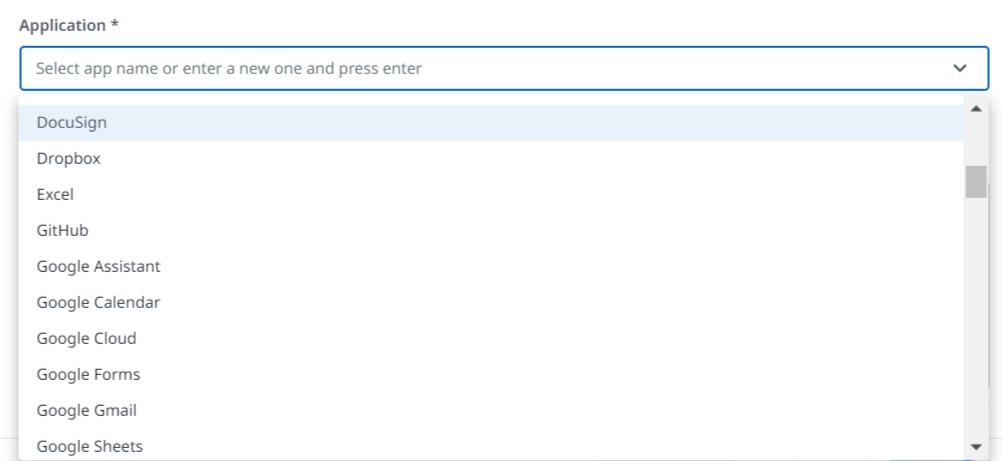
## 5. Application
Select the application for which you offer automation services. E.g. Excel, SAP, Outlook.
If the necessary application name is not on the list, type its name, press enter and we'll add it for you.
## 6. Overview
(5000 characters max.)
This section needs to be well structured while at the same time it should keep the audience engaged enough to read it through. It should be used to generate trust for customers by showing a high level of proficiency in the area of service you promote.
The Overview needs to include all relevant details about:
* Services offer
* High-level implementation (steps of the process)
* Use cases it addresses
* Target audience
* Pain points or needs that it solves
Now that we got the text structure covered, let’s go through some of the easiest but very impactful copywriting tips and tricks you can follow:
Tip
Description
Say more with less
avoid long and very technical sentences that leave room for ambiguity
write text in a concise manner
Make the text easy to read
avoid big chunks of paragraphs
format text using proper spacing, bullet-point lists, numbered headers, etc.
Engage with your audience
write as if you are speaking directly to your customer
ask rhetorical questions, mention use cases or testimonials relevant for your target audience
finish it all with a powerful call to action
:::note
To make this part less complicated, we recommend you use two (free) writing apps: [Grammarly](https://app.grammarly.com/) and [Hemingway App](https://hemingwayapp.com/). They come in handy when you are spell-checking or rephrasing the text and can save you some time.
:::
## 7. Skills / Expertise
(5000 characters max.)
This section should list specific details about the skills and expertise you own for the services offered, meaning:
* aptitudes
* certifications
* trainings
* skills
Once you indicate all the necessary information, please click on the **Next** button to move to the next part of the submission process.
:::note
The Files & Terms section of the Upload form is described [here](https://docs.uipath.com/marketplace/automation-cloud/latest/user-guide/files-terms-1#files-%26amp%3B-terms).
:::