# UiPath Deploy
> Application: **RPA**
Application: **RPA**
Type: **Post-Build task**
**UiPath Deploy** is available in standard jobs and pipelines, and lets you deploy a UiPath NuGet package onto UiPath Orchestrator.
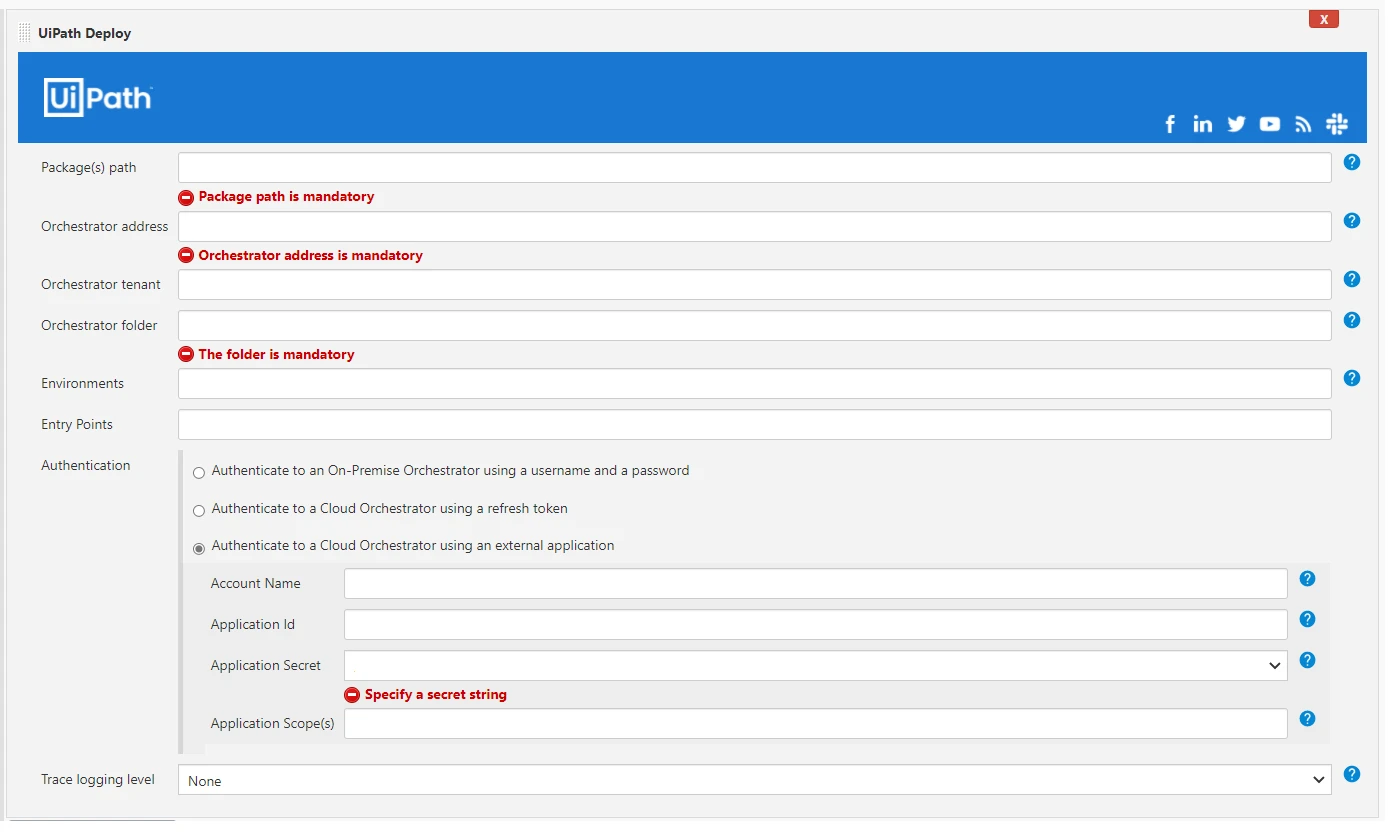
## Configuration
Job parameter
Description
Package(s) path
The folder that holds your UiPath nuget package(s).
Orchestrator address
The address of the Orchestrator instance onto which the package(s) will be deployed.
Orchestrator tenant
The Orchestrator tenant onto which the package(s) will be deployed.
Orchestrator folder
The folder to deploy to. If the folder is a Classic folder, you'll also need to set the
environments field. For Modern folders, setting the
environments field is not required.
To input subfolders make sure to input both the parent folder name and the name
of the subfolder. For instance, use AccountingTeam\TeamJohn.
Environments (Required for Classic folders)
The environment onto which the package will be deployed as a process. For the project and environment with existing processes,
the processes will be updated to use the latest project version. Specify the environment onto which the package will be deployed
as a process. For the project and environment with existing processes, the processes will be updated to use the latest project
version.
Entry Points
Specify entry points to create or update a process. The entry point specifies the filePath starting from the root of the project.
Conditions:
Entry points are available for Orchestrator version 21.4 or higher (for example, 21.4.UiPathDeploy.entryPoints). For Orchestrator versions lower than 21.4, you need to enter any value, as the field must not remain empty.
Default entry point set to Main.xaml.
For classic folders (deprecated) you can specify only one entry point for each environment.
For more information, see Orchestrator Entry Points.
Authentication
For authentication towards Orchestrator, you need to create credentials in Jenkins upfront. There are four options to authenticate:
(1) Authenticate to an on-premise Orchestrator using username and password.
(2) Authenticate to a cloud Orchestrator using a refresh token (API key).
(3) Authenticate to a cloud Orchestrator using external app authentication.
(4) Authenticate to an on-premise Orchestrator using .
Trace logging level
Setting used to enable trace logging to one of the following levels:
None
Critical
Error
Warning
Information
Verbose. (The default is set to None).
Useful for debugging purposes.
:::note
Make sure that your network allows access to the following NuGet package feed:
* https://api.nuget.org/v3/index.json
* https://uipath.pkgs.visualstudio.com/_packaging/nuget-packages/nuget/v3/index.json
* https://uipath.pkgs.visualstudio.com/Public.Feeds/_packaging/UiPath-* Internal/nuget/v3/index.json
* https://www.myget.org/F/workflow
* http://www.myget.org/F/uipath
* https://www.myget.org/F/uipath-dev/api/v3/index.json
:::
## Pipeline example
```
pipeline {
agent any
environment {
MAJOR = '1'
MINOR = '0'
}
stages {
stage ('PostBuild') {
steps {
UiPathDeploy (
packagePath: "path\)\)\) o\)\)NuGetpackage",
orchestratorAddress: "OrchestratorUrl",
orchestratorTenant: "tenant name",
folderName: "folder name",
environments: "environment",
credentials: [$class: 'UserPassAuthenticationEntry', credentialsId: “credentialsId”],
traceLoggingLevel: 'None'
)
}
}
}
}
```