# Choice set
> A **Choice Set** field is used to store an enumerated list from which one or more values can be selected. A Choice Set can be used, for example, to select an expense type, a forum post category, or a certain edition of a recurring event.
A **Choice Set** field is used to store an enumerated list from which one or more values can be selected. A Choice Set can be used, for example, to select an expense type, a forum post category, or a certain edition of a recurring event.
## Details
Below is an overview of the details that can be specified to define a **Choice Set** field.
Property
Description
Required
Default Value
Choice Set
Enables you to select the choice set you want to use for the field, or to create a new choice set. Note: You can click View all Choice Sets to access the Choice Sets module.
Yes
Allow multiple selections
Enables you to specify whether more than one value can be selected from the available choices.
No
No
Required
Enables you to specify whether the field is required or not.
No
No
Description
Enables you to enter a short text to describe the purpose of the Choice Set field. Note: The Description is displayed in Fields tab.
No
## Creating a Choice Set From the Create Field Panel
When the Choice Set you want to use is not yet available, you can create it by clicking the **Create New option displayed under the **Choice Set** drop-down list.
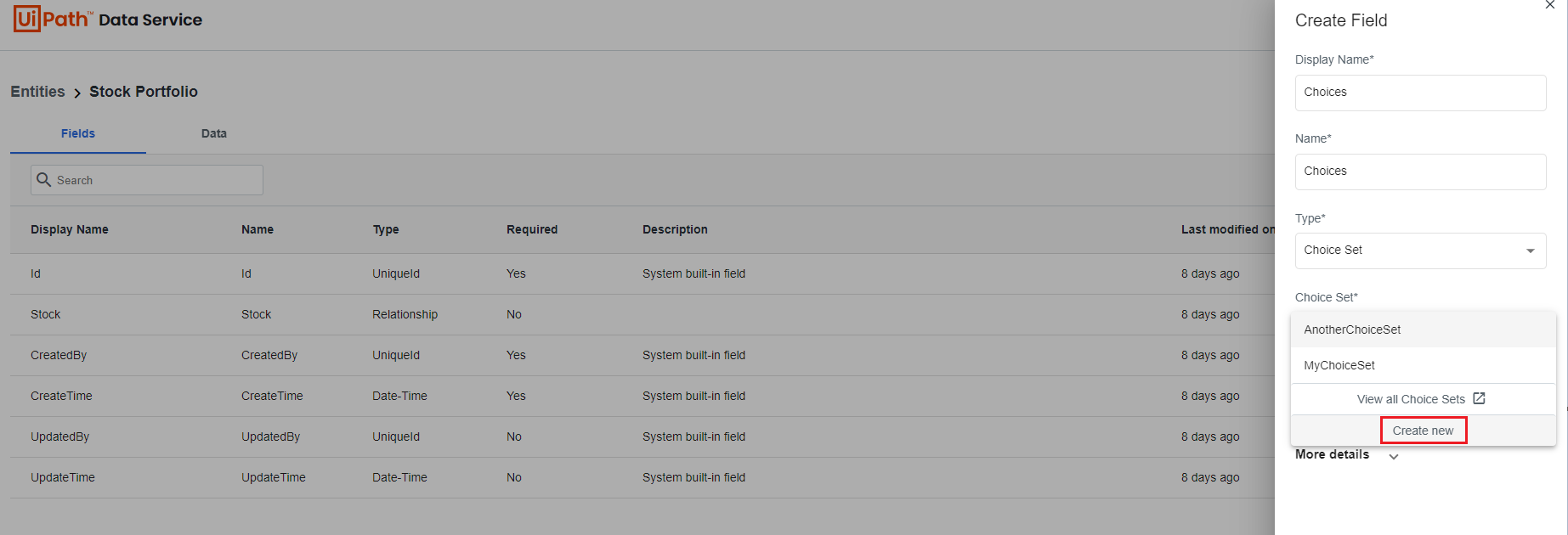
The **Create Choice Set** panel is displayed allowing you to create the new Choice Set. Check the [Creating Choice Sets section](https://docs.uipath.com/data-service/automation-suite/2.2510/user-guide/choice-sets#creating-a-choice-set) for step by step details. The new choice is automatically added to the **Choice Sets** in the [Choice Sets](https://docs.uipath.com/data-service/automation-suite/2.2510/user-guide/choice-sets#choice-sets) module.
## Representation in UiPath® Studio
A **Choice Set** field is imported as `Enum` in your project. When multiple selections are allowed for the choice set the field type in Studio is `HashSet`.