# The query builder
> The **Query builder** allows you to filter data from Data Service entities, while respecting a predefined syntax.
The **Query builder** allows you to filter data from Data Service entities, while respecting a predefined syntax.
:::important
The `Fetch`, `FetchOne`, `GetChoiceSet`, and `GetChoiceSetValue` functions are asynchronous, and do not support chaining.
To display entity records in a control, use an app variable and the [Set Value](https://docs.uipath.com/apps/automation-cloud/latest/user-guide/rule-set-values#rule%3A-set-value) rule.
You can also bind the control data source to your entity using the **Query builder**.
Refer to [Using the Fetch functions](https://docs.uipath.com/apps/automation-cloud/latest/user-guide/using-the-fetch-functions#using-the-fetch-functions) for practical examples.
:::
:::tip
To refresh an entity variable on page load or button click, add a **Set value** rule. Open the Query builder in set value rule and add a filter condition for **UpdateTime <= now( )**.
:::
## Using the query builder
The **Query builder** uses the `Fetch()` function to evaluate and sort your Data Service entities.
As a prerequisite, you must reference existing Data Service entities into your app. To use the **Query builder**, proceed with the following steps:
1. For the desired control, select a VB enabled property. You can identify these types of properties by the **VB Data source** field in the **General** tab.
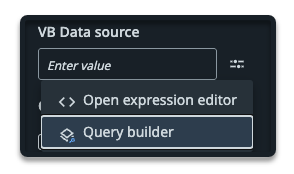
2. Select **Query builder**. This opens the Query builder window.
3. Select the entity for which you want to build the query for.
4. On the **Conditions** tab, click:
| Option | Description |
| --- | --- |
| **Add condition** | to add a single condition |
| **Add group** | to group several conditions |
When you add two or more conditions, the query evaluates and returns data based on **AND** or **OR** operators:
* **AND** - returns data where all conditions are met
* **OR** - returns data where any condition is met
5. Select the entity field which you want to query data from.
6. Select the evaluation operator.
7. Enter the value for your condition. The value must be of the same type as the field type. For example, use strings for **Text** fields, use integers for **Number** fields.
8. Optionally, configure rules for the queried data on the **Additional settings** tab.
9. Select **Save** to save your query.
### Additional settings
On the **Additional settings** tab, you can configure rules for the queried data.
The following table describes the elements of the **Additional settings** tab.
Element
Description
Page start index (skip)
Enables you to define how many records to skip before starting to return results. For example, if you enter 10 , the query starts from the 11th record. Setting a Page start index can be useful for pagination when using large datasets.
Page limit (top)
Enables you to set the maximum number of records to return. For example, if you enter 50, the query returns the first 50 rows. Setting a Page limit helps control query size.
Add sort field
Adds a sort field that allows you to configure a sorting rule for the queried data. The Sort by field and the Sort ascending elements display.
Sort by field
Enables you to enter the field you to use for sorting the data.
Sort ascending
If true, sorts the queried data in an ascending order.
Projection
Enables you to define a specific field from the entity that only should be included in the result set.
Projection can be used to simplify output data.
Projection is available only when the Query builder is opened from the Set value rule.
## The fetch function
The query builder uses the `Fetch()` function to retrieve and manipulate entity data. The `Fetch()` function is asynchronous, and it does not support chaining.
The `Fetch()` function has the following parameters:
| **Parameter** | **Description** |
| --- | --- |
| `FilterGroup` | A group of filters in Data Service |
| `PaginationProps` | Specify page size and number of records to skip. |
| `SortOption[] sortOptions` | Specify the column to sort and the order for sorting. |
| `string[] selectedFields` | Specify the entity fields that should be returned. |
| `ExpansionFieldOption[] expansionFieldOptions` | Specify which column of a relationship entity should be expanded and returned. Apps allows level one expansions, meaning that if you have a relationship field, the expressions expects one level of properties to be accessible. The query builder automatically adds these properties, and they are mandatory for the non-system entities. |
### The FetchOne() function
While `Fetch()` returns a `ListSource`, which is the same type as for list controls, `FetchOne()` returns a single record of type T.
Like the`Fetch()` function, the `FetchOne()` function is asynchronous, and it does not support chaining.
For the following scenarios you need to manually modify the `Fetch()` function, to get more customized results:
### Simple fetch
Gets the number of records for an entity, for example **SystemUsers**.
```
Fetch(of SystemUsers)()
```
### Fetch with filter condition
```
Fetch(of SystemUsers)(createFilterGroup(new QueryFilter(){addFilter("Name", "=", "You")}), new PaginationProps(0, 10))
```
### Fetch with filter condition and sort order (ascending)
```
Fetch(of SystemUsers)(createFilterGroup(new QueryFilter(){addFilter("Name", "=", "You")}), new PaginationProps(0, 10), new SortOption(){addSortOption("Date")})
```
### Fetch with filter condition and sort order (descending)
```
Fetch(of SystemUsers)(createFilterGroup(new QueryFilter(){addFilter("Name", "=", "You")}), new PaginationProps(0, 10), new SortOption(){addSortOption("Date", true)})
```
### Fetch with static PaginationProps
```
Fetch(of SystemUsers)(Nothing, new PaginationProps(0, 100))
```
### Fetch with control bound PaginationProps
For example, for the **Edit Grid** control:
```
Fetch(of SystemUsers)(Nothing, new PaginationProps(MainPage.EditableGrid.PageStart, MainPage.EditableGrid.PageLimit))
```
### Fetch with projection
```
Fetch(of SystemUsers)(createFilterGroup(new QueryFilter(){addFilter("Name", "=", "You")}), new PaginationProps(0, 10), Nothing, new string(){"Name"})
```