# July 2021
> To improve the user experience, the interface for apps access control is updated as following:
## 19 July 2021
### What’s new
### Improvements
#### Access control interface
To improve the user experience, the interface for apps access control is updated as following:
* The **Permissions** tab is now called **Manage Access**
* The **Permission** column is now called **ROLE**
* The **Add User/Group** button is now called **Assign role**
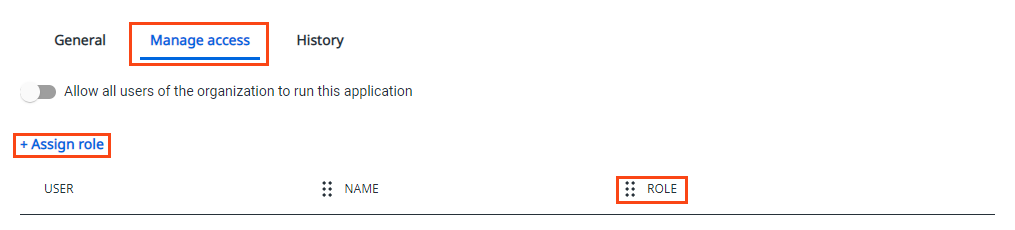
When clicking on **+ Assign role**, the following changes are done to the interface:
* The title of the dialog box is now **Assign role**
* The text above the textbox is now **Search users and groups**
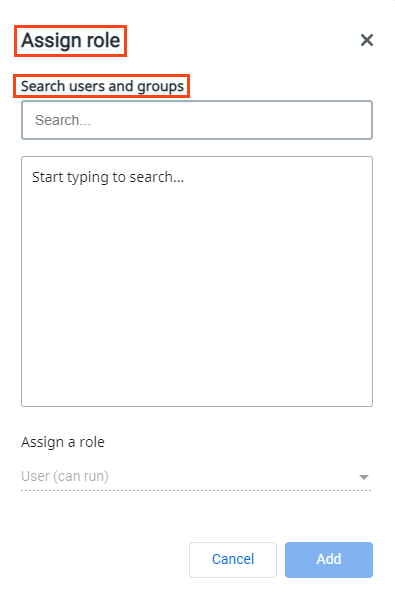
For more information on setting different roles for your app, see [Permission Management](https://docs.uipath.com/apps/automation-cloud/latest/legacy-user-guide/permission-management).
#### Academy link
You can now navigate to the **UiPath® Academy** course for **Apps** directly from the **Apps** homepage.
#### App settings icon
We added a  gear icon next to the app name to easily access **Apps Settings**.
#### Orchestrator definition
For improved user experience, the **Orchestrator** definition has been removed when there are no processes associated with the app. Processes are not displayed as a section in tree view if there are no processes in the app.
### Bug fixes
* Previously, when creating an app and deleting a process after binding controls, an invalid binding error was not displayed automatically in the tree view. This is now fixed and an invalid binding error is automatically displayed for all control in the tree view.
* Previously, the event for Table control was triggered twice. This is now fixed and only one event is triggered.
* Previously, the **Close pop-over** rule did not work. This is now fixed and the **Close pop-over** rule from the Rules Builder works as expected.
* Previously, after deleting al your apps and creating a new one, dropping any controls did not work after dismissing the pop-over. This is now fixed and you can drag and drop any controls.
* Previously, when clicking on the chevron to expand or collapse the section in the resource panel, nothing happened. This is now fixed and you can expand or collapse the section when clicking on the chevron.
* Previously, when there was a high number of rules in the rules builder, a new rule could not be dropped in a specified location. This is now fixed and you can drag and drop a new rule in a specified position, even if the number of rules is high.
## 5 July 2021
### What’s new
#### User context references
You can now create personalized apps using runtime user context functions, by using one of the following references to display the runtime user:
* First name
* Last name
* Email For more information on this, see [User Context References](https://docs.uipath.com/apps/automation-cloud/latest/legacy-user-guide/user-context-references).
#### Group email
With this release, the group users receive an e-mail notification when an application is shared with them.
#### Community servers
A new specific Cloud instance for **UiPath® Apps** is made available for community users. Existing community users will receive the update in the same timeline with enterprise users until the migration to the new community servers is done.
### Improvements
#### User experience improvement
* The **Apps** section is now always visible in the **UiPath® Automation Cloud** homepage. The first visible tile for **Apps** is now **Create an app**.
* A **Create an app** tile is now always visible in the **Apps** homepage.
#### New default page
The container layout is no longer the default control when creating a new page in an app.
#### Margin and width settings notification
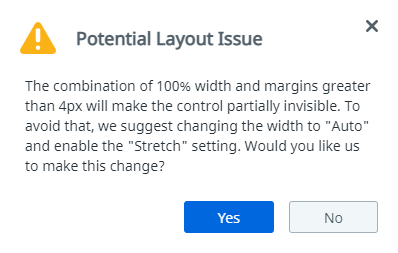
A notification is added when setting the control width to 100% and the margin bigger than 0 px. The notification is used to suggest using the **Stretch** and **Auto** settings instead of 100% and specific margin for improved user experience.
### Bug fixes
* Previously, when duplicating a page two events are displayed on the page. This is now fixed and the only event displayed is **Loaded**.
* Previously, when setting multiple rules on one page and then copying the output values as input values to another process, the process was not triggered automatically. This is now fixed and the process is triggered automatically on value change.
* Runtime no longer gets stuck after importing an application and previewing after replacing a process.