# January 2022
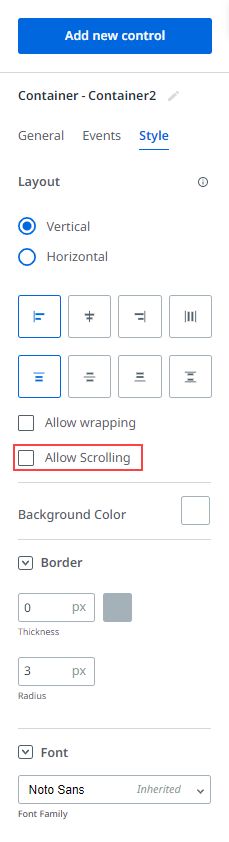
> We introduced a new property for containers called **Allow scrolling**. If you enable this property, a scroll bar is added to the container if the content cannot fit within the space. To enable **Allow scrolling**, the container must have a fixed height (vertical layout) or fixed width (horizontal layout).
## 28 January 2022
### What’s new
#### New property for containers
We introduced a new property for containers called **Allow scrolling**. If you enable this property, a scroll bar is added to the container if the content cannot fit within the space. To enable **Allow scrolling**, the container must have a fixed height (vertical layout) or fixed width (horizontal layout).
### Improvements
* We are happy to announce a new **How To** page in the **UiPath® Apps** guide, [Including Star Ratings](https://docs.uipath.com/apps/automation-cloud/latest/legacy-user-guide/include-star-ratings). Follow the steps from this page to create a star rating for your new or existing app.

### Bug fixes
* Fixed an issue where deleting an entity caused empty bindings in expressions.
* Fixed an issue where the tooltips for icons were not translated properly.
## 13 January 2022
### What’s new
#### Apps integration with Data Service General Availability
We are very excited to announce that the Apps integration with Data Service is now in General Availability.
For more information on the functions and rules related to Entities, see the following guides:
* [Function: Filter](https://docs.uipath.com/apps/automation-cloud/latest/legacy-user-guide/function-filter)
* [Function: Sort](https://docs.uipath.com/apps/automation-cloud/latest/legacy-user-guide/function-sort)
* [Function: Lookup](https://docs.uipath.com/apps/automation-cloud/latest/legacy-user-guide/function-lookup)
* [Function: New](https://docs.uipath.com/apps/automation-cloud/latest/legacy-user-guide/function-new)
* [Rule: Create/Update Entity Record](https://docs.uipath.com/apps/automation-cloud/latest/legacy-user-guide/rule-create-update-entity-record)
* [Rule: Delete Entity Record](https://docs.uipath.com/apps/automation-cloud/latest/legacy-user-guide/rule-delete-entity-record)
* [Referencing an Entity in your App](https://docs.uipath.com/apps/automation-cloud/latest/legacy-user-guide/referencing-an-entity-in-your-app)
* [Replacing an Entity](https://docs.uipath.com/apps/automation-cloud/latest/legacy-user-guide/replacing-an-entity)
* [About Data Context](https://docs.uipath.com/apps/automation-cloud/latest/legacy-user-guide/about-data-context)
For more information on how to use Apps with Data Service, see [Using Apps with Data Service](https://docs.uipath.com/apps/automation-cloud/latest/legacy-user-guide/using-apps-with-data-service).
#### New controls
We are very excited to announce the addition of two new controls:
* **Radio Button** - You can now use a radio button instead of drop-down list if you have fewer options to display.
* **IFrame** - You can now embed other applications within **UiPath® Apps** using the **IFrame** control. For more information, see the [Radio Button](https://docs.uipath.com/apps/automation-cloud/latest/legacy-user-guide/radio-button) and [IFrame](https://docs.uipath.com/apps/automation-cloud/latest/legacy-user-guide/iframe) pages.
#### New function
We are very excited to announce the addition of the **New** function. You can use this function to create a new in-memory entity record. This entity is not stored in the data service until a **Create entity** rule is run.
For more information, see the [Function: New](https://docs.uipath.com/apps/automation-cloud/latest/legacy-user-guide/function-new) and [Using the New Function](https://docs.uipath.com/apps/automation-cloud/latest/legacy-user-guide/using-data-context) pages.
### Improvements
* You can now add a new rule between existing rules, not only at the bottom. To do so, click on the  symbol between the rules in the rules builder.

* A selected value property is now added to **Dropdown** and **List** controls. You can now bind the selected value from dropdowns and lists to other controls.
### Bug fixes
* Fixed an issue for the **Todo** sample part of the Data Service integration where an error was displayed when relinking the **Todo** entity.
### Known issues
* The font does not change when switching between the Courier, Courier New, Palatino, and Times New Roman fonts in a control property.