# About Selectors
> To automate specific actions in the user interface, you are required to interact with various windows, buttons, drop-down lists and many others. One of the ways in which UI elements can be identified is by using their position on the screen, but this can be unreliable.
To automate specific actions in the user interface, you are required to interact with various windows, buttons, drop-down lists and many others. One of the ways in which UI elements can be identified is by using their position on the screen, but this can be unreliable.
To overcome this problem, Studio uses what we call selectors. These store the attributes of a graphical user interface element and its parents, in the shape of an XML fragment.
Most of the times, selectors are automatically generated by Studio and do not require further input from you, especially if the apps you are trying to automate have a static user interface.
However, some software programs have changing layouts and attribute nodes with volatile values, such as some web-apps. Studio cannot predict these changes and, therefore, you might have to manually generate some selectors.
A selector has the following structure:
```
...
```
The last node represents the GUI element that interests you, and all the previous ones represent the parents of that element. <node_1> is usually referred to as a root node, and represents the top window of the app.
Each node has one or more attributes that help you correctly identify a specific level of the selected application.
Each node has the following format:
```
```
Every attribute has an assigned value. It is important to pick attributes with a constant value. If the value of an attribute changes each time the app is started, then the selector will not be able to correctly identify the element.
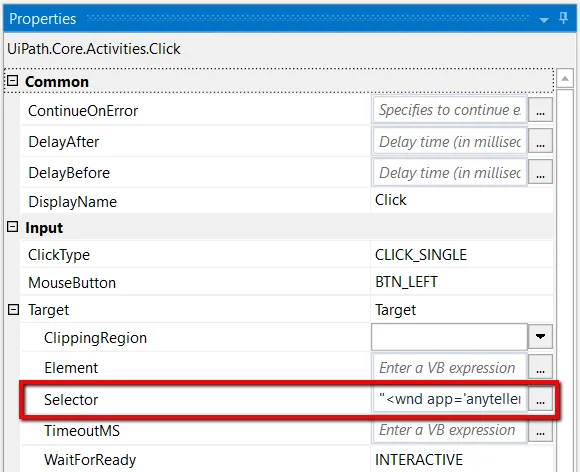
Selectors are displayed in the **Properties** panel of activities, under **Input > Target > Selector**. All activities related to graphical elements have this property.
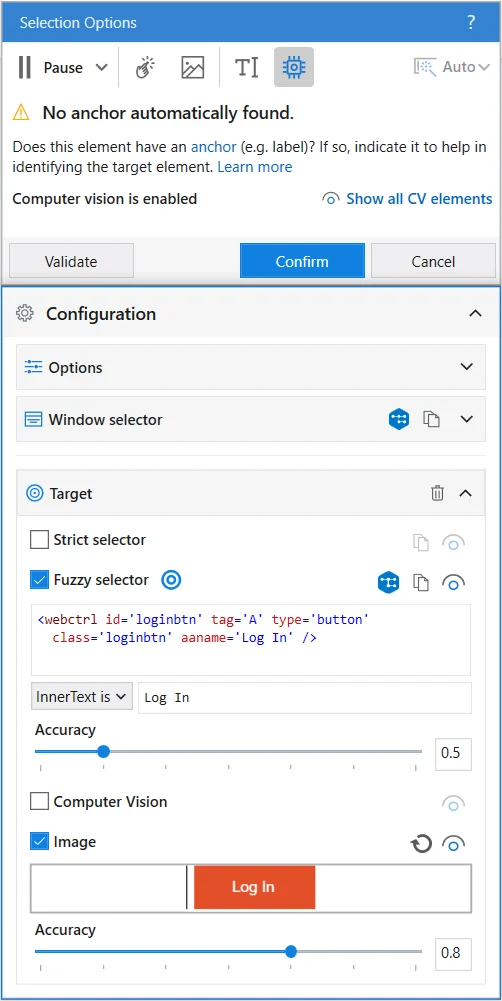
The **Selection Options** window enables you to select and edit a target. To access this window, in the **Workflow Designer** panel, click the Options  button in the body of an activity and select **Indicate target on screen** or **Edit target**.
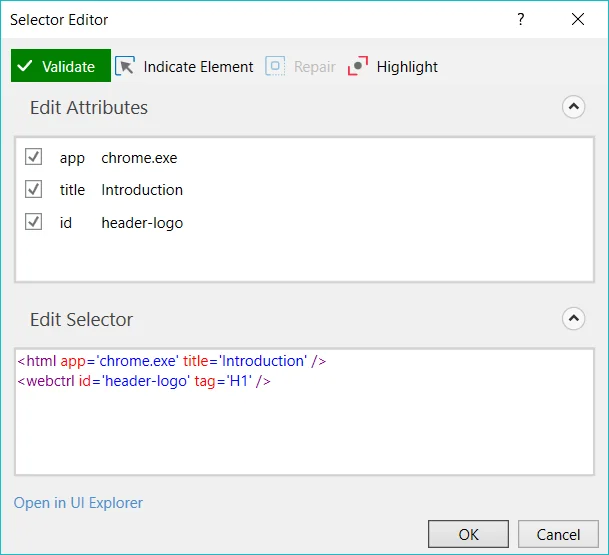
The **Selector Editor** window enables you to see the automatically-generated selector and edit it and its attributes. To access this window, use the Ellipsis button next to the **Selector** field, in the **Properties** panel.
Option
Description
Validate
The button shows the status of the selector by checking the validity of the selector definition and the visibility of the target element on the screen.
The Validate button has three states:
Selector is being validated
Valid selector
Invalid selector
Modified selector, revalidate
The button is correlated with UI Explorer validation states.
Indicate Element
Indicate a new UI element to replace the previous one.
Repair
Enables you to re-indicate the same target UI element and repair the selector. This operation does not completely replace the previous selector. The button is available only when the selector is invalid.
Highlight
Brings the target element in the foreground. The highlight stays on until the option is disabled with a click. The button is enabled only if the selector is valid.
Edit Attributes
Contains all the application components needed to identify the target application (a window, a button etc.). This section is editable.
Edit Selector
Holds the actual selector. This section is editable.
Open in UI Explorer
Launches the UI Explorer. The option is enabled only for valid selectors.
:::note
In some situations, when Studio and the targeted application are opened with different elevated privileges, the selector might not work. We recommend to always open both applications with the same privileges.
:::
## Supported Tags and Attributes
The following tables present the compatibility between tags and attributes used to build selectors and the selector capability.
On macOS the selector types `wnd`, `ax`, `java`, and `sap` can be used for different use cases:
* AX selectors are available for all types of macOS desktop applications.
* SAP selectors are available for SAP GUI for Java on macOS and require a SAP server with scripting enabled. These selectors are the most stable for SAP applications and offer the best range of features, like extracting table data.
* Java selectors are available for Java applications. Since SAP GUI for Java is also a Java based application, one can use the Java selection strategy to switch from the default one and get Java selectors instead.
:::note
Selectors generated for Java applications which contain multiple **WND** tags cannot be used with events monitoring.
:::
### WND
| **Attribute** | **Fuzzy** | **RegEx** | **Case-Sensitive** | **OS** |
| --- | --- | --- | --- | --- |
| **app** | ✅ | ✅ | ✅ | Windows macOS |
| **cls** | ✅ | ✅ | ✅ | Windows |
| **title** | ✅ | ✅ | ✅ | Windows macOS |
| **aaname** | ✅ | ✅ | ✅ | Windows |
| **ctrlname** (WinForms) | ✅ | ✅ | ✅ | Windows |
| **ctrlid** (WinForms) | ✅ | ✅ | ✅ | Windows |
| **idx** | ❌ | ❌ | ❌ | Windows macOS |
| **tid** | ❌ | ❌ | ❌ | Windows macOS |
| **pid** | ❌ | ❌ | ❌ | Windows macOS |
| **isremoteapp** | ❌ | ❌ | ❌ | Windows |
| **aastate** | ✅ | ✅ | ✅ | Windows |
| **role** | ✅ | ✅ | ✅ | macOS |
| **enabled** | ✅ | ✅ | ✅ | macOS |
| **focused** | ✅ | ✅ | ✅ | macOS |
| **selected** | ✅ | ✅ | ✅ | macOS |
| **expanded** | ✅ | ✅ | ✅ | macOS |
| **sapClient** (SAP) | ✅ | ✅ | ✅ | Windows macOS |
| **sapLanguage** (SAP) | ✅ | ✅ | ✅ | Windows macOS |
| **sapProgram** (SAP) | ✅ | ✅ | ✅ | Windows macOS |
| **sapScreen** (SAP) | ❌ | ❌ | ❌ | Windows macOS |
| **sapSession** (SAP) | ❌ | ❌ | ❌ | Windows macOS |
| **sapSysName** (SAP) | ✅ | ✅ | ✅ | Windows macOS |
| **sapSysNumber** (SAP) | ❌ | ❌ | ❌ | Windows macOS |
| **sapSysSessionId** (SAP) | ✅ | ✅ | ✅ | Windows macOS |
| **sapTransaction** (SAP) | ✅ | ✅ | ✅ | Windows macOS |
| **sapUser** (SAP) | ✅ | ✅ | ✅ | Windows macOS |
| **curlApplet** (Curl) | ✅ | ✅ | ✅ | Windows |
### HTML
| **Attribute** | **Fuzzy** | **RegEx** | **Case-Sensitive** | **OS** |
| --- | --- | --- | --- | --- |
| **url** | ✅ | ✅ | ✅ | Windows macOS Linux |
| **htmlwindowname** | ✅ | ✅ | ✅ | Windows macOS Linux |
| **title** | ✅ | ✅ | ✅ | Windows macOS Linux |
| **class** | ✅ | ✅ | ✅ | Windows macOS Linux |
| **app** | ❌ | ❌ | ❌ | Windows macOS Linux |
| **idx** | ❌ | ❌ | ❌ | Windows macOS Linux |
| **pid** | ❌ | ❌ | ❌ | Windows macOS Linux |
| **tid** | ❌ | ❌ | ❌ | Windows macOS Linux |
| **excludehwnd** | ❌ | ❌ | ❌ | Windows macOS Linux |
| **bsid** (Browser Session ID) | ❌ | ❌ | ❌ | Windows macOS Linux |
| **isremoteapp** | ❌ | ❌ | ❌ | Windows macOS Linux |
### WEBCTRL
The **tag** and **idx** attributes use string values. All other **WEBCTRL** attributes have dynamic values.
| **Attribute** | **Fuzzy** | **RegEx** | **Case-Sensitive** | **OS** |
| --- | --- | --- | --- | --- |
| **tag** | ✅ | ✅ | ✅ | Windows macOS Linux |
| **idx** | ✅ | ✅ | ✅ | Windows macOS Linux |
| **aaname** | ✅ | ✅ | ✅ | Windows macOS Linux |
| **name** | ✅ | ✅ | ✅ | Windows macOS Linux |
| **id** | ✅ | ✅ | ✅ | Windows macOS Linux |
| **parentid** | ✅ | ✅ | ✅ | Windows macOS Linux |
| **class** | ✅ | ✅ | ✅ | Windows macOS Linux |
| **css-selector** | ❌ | ❌ | ❌ | Windows macOS Linux |
| **innertext** | ✅ | ✅ | ✅ | Windows macOS Linux |
| **visibleinnertext** | ✅ | ✅ | ✅ | Windows macOS Linux |
| **isleaf** | ✅ | ✅ | ✅ | Windows macOS Linux |
| **parentclass** | ✅ | ✅ | ✅ | Windows macOS Linux |
| **parentname** | ✅ | ✅ | ✅ | Windows macOS Linux |
| **src** | ✅ | ✅ | ✅ | Windows macOS Linux |
| **href** | ✅ | ✅ | ✅ | Windows macOS Linux |
| **tableCol** | ✅ | ✅ | ✅ | Windows macOS Linux |
| **tableRow** | ✅ | ✅ | ✅ | Windows macOS Linux |
| **colName** | ✅ | ✅ | ✅ | Windows macOS Linux |
| **rowName** | ✅ | ✅ | ✅ | Windows macOS Linux |
| **aria-label** | ✅ | ✅ | ✅ | Windows macOS Linux |
| **aria-labelledby** | ✅ | ✅ | ✅ | Windows macOS Linux |
### CTRL
| **Attribute** | **Fuzzy** | **RegEx** | **Case-Sensitive** | **OS** |
| --- | --- | --- | --- | --- |
| **role** | ✅ | ✅ | ✅ | Windows |
| **name** | ✅ | ✅ | ✅ | Windows |
| **automationid** | ✅ | ✅ | ✅ | Windows |
| **labeledby** | ✅ | ✅ | ✅ | Windows |
| **aastate** | ✅ | ✅ | ✅ | Windows |
| **virtualname** | ✅ | ✅ | ✅ | Windows |
| **text** | ✅ | ✅ | ✅ | Windows |
| **rowName** | ✅ | ✅ | ✅ | Windows |
| **idx** | ❌ | ❌ | ❌ | Windows |
### UIA
| **Attribute** | **Fuzzy** | **RegEx** | **Case-Sensitive** | **OS** |
| --- | --- | --- | --- | --- |
| **accelkey** (Accelerator Key) | ✅ | ✅ | ✅ | Windows |
| **acskey** (Access Key) | ✅ | ✅ | ✅ | Windows |
| **automationid** | ✅ | ✅ | ✅ | Windows |
| **cls** | ✅ | ✅ | ✅ | Windows |
| **helpText** | ✅ | ✅ | ✅ | Windows |
| **legacyAccHelp** (Legacy Accessible Help) | ✅ | ✅ | ✅ | Windows |
| **enabled** | ✅ | ✅ | ✅ | Windows |
| **kbfocus** (Is Keyboard Focusable) | ✅ | ✅ | ✅ | Windows |
| **ispwd** (Is Password) | ✅ | ✅ | ✅ | Windows |
| **itemstatus** | ✅ | ✅ | ✅ | Windows |
| **itemtype** | ✅ | ✅ | ✅ | Windows |
| **rtid** (Runtime ID) | ✅ | ✅ | ✅ | Windows |
| **role** | ✅ | ✅ | ✅ | Windows |
| **name** | ✅ | ✅ | ✅ | Windows |
| **pid** | ✅ | ✅ | ✅ | Windows |
| **tableRow** | ❌ | ❌ | ❌ | Windows |
| **tableCol** | ❌ | ❌ | ❌ | Windows |
| **rowName** | ✅ | ✅ | ✅ | Windows |
| **colName** | ✅ | ✅ | ✅ | Windows |
| **idx** | ❌ | ❌ | ❌ | Windows |
### JAVA
| **Attribute** | **Fuzzy** | **RegEx** | **Case-Sensitive** | **OS** |
| --- | --- | --- | --- | --- |
| **role** | ✅ | ✅ | ✅ | Windows macOS |
| **name** | ✅ | ✅ | ✅ | Windows macOS |
| **virtualname** | ✅ | ✅ | ✅ | Windows macOS |
| **javastate** | ✅ | ✅ | ✅ | Windows macOS |
| **tableRow** | ❌ | ❌ | ❌ | Windows macOS |
| **tableCol** | ❌ | ❌ | ❌ | Windows macOS |
| **rowName** | ✅ | ✅ | ✅ | Windows macOS |
| **colName** | ✅ | ✅ | ✅ | Windows macOS |
| **idx** | ❌ | ❌ | ❌ | Windows macOS |
| **cls** | ✅ | ✅ | ✅ | Windows macOS |
| **accessibleClass** | ✅ | ✅ | ✅ | Windows macOS |
### SAP
| **Attribute** | **Fuzzy** | **RegEx** | **Case-Sensitive** | **OS** |
| --- | --- | --- | --- | --- |
| **id** | ✅ | ✅ | ✅ | Windows macOS |
| **leafid** This attribute is not exposed in the **Attribute** panel because it is mutual-exclusive with the **id** attribute. It can be added manually. | ✅ | ✅ | ✅ | Windows macOS |
| **tableRow** | ❌ | ❌ | ❌ | Windows macOS |
| **tableCol** | ❌ | ❌ | ❌ | Windows macOS |
| **colName** | ✅ | ✅ | ✅ | Windows macOS |
| **relpath** | ✅ | ✅ | ✅ | Windows macOS |
| **itemId** | ✅ | ✅ | ✅ | Windows macOS |
### AX
| **Attribute** | **Fuzzy** | **RegEx** | **Case-Sensitive** | **OS** |
| --- | --- | --- | --- | --- |
| **role** | ✅ | ✅ | ✅ | macOS |
| **subrole** | ✅ | ✅ | ✅ | macOS |
| **name** | ✅ | ✅ | ✅ | macOS |
| **title** | ✅ | ✅ | ✅ | macOS |
| **identifier** | ✅ | ✅ | ✅ | macOS |
| **filename** | ✅ | ✅ | ✅ | macOS |
| **url** | ✅ | ✅ | ✅ | macOS |
| **help** | ✅ | ✅ | ✅ | macOS |
| **enabled** | ✅ | ✅ | ✅ | macOS |
| **focused** | ✅ | ✅ | ✅ | macOS |
| **selected** | ✅ | ✅ | ✅ | macOS |
| **expanded** | ✅ | ✅ | ✅ | macOS |
| **idx** | ❌ | ❌ | ❌ | macOS |
| **rowCount** | ❌ | ❌ | ❌ | macOS |
| **columnCount** | ❌ | ❌ | ❌ | macOS |
| **tableRow** | ❌ | ❌ | ❌ | macOS |
| **tableCol** | ❌ | ❌ | ❌ | macOS |
| **rowName** | ✅ | ✅ | ✅ | macOS |
| **colName** | ✅ | ✅ | ✅ | macOS |
### CURL
| **Attribute** | **Fuzzy** | **RegEx** | **Case-Sensitive** | **OS** |
| --- | --- | --- | --- | --- |
| **cls** | ✅ | ✅ | ✅ | Windows |
| **role** | ✅ | ✅ | ✅ | Windows |
| **text** | ✅ | ✅ | ✅ | Windows |
| **title** | ✅ | ✅ | ✅ | Windows |
| **tableRow** | ❌ | ❌ | ❌ | Windows |
| **tableCol** | ❌ | ❌ | ❌ | Windows |
| **colHeader** | ✅ | ✅ | ✅ | Windows |
| **idx** | ❌ | ❌ | ❌ | Windows |
### SILVERLIGHT
Please note that the **Silverlight** tag does not support [Fuzzy](https://docs.uipath.com/activities/other/latest/ui-automation/fuzzy-search-capabilities#fuzzy-search), [RegEx](https://docs.uipath.com/activities/other/latest/ui-automation/regex-search#regex-search), and [Case-Sensitive](https://docs.uipath.com/activities/other/latest/ui-automation/case-sensitive-selectors#case-sensitive-selectors) capabilities.
| **Attribute** | **Fuzzy** | **RegEx** | **Case-Sensitive** | **OS** |
| --- | --- | --- | --- | --- |
| **role** | ❌ | ❌ | ❌ | Windows |
| **name** | ❌ | ❌ | ❌ | Windows |
| **text** | ❌ | ❌ | ❌ | Windows |
| **idx** | ❌ | ❌ | ❌ | Windows |
### RDP
The **RDP** tag is used for remote automation and its attributes are identical to **WND** tag.
| **Attribute** | **Fuzzy** | **RegEx** | **Case-Sensitive** | **OS** |
| --- | --- | --- | --- | --- |
| **app** | ✅ | ✅ | ✅ | Windows |
| **cls** | ✅ | ✅ | ✅ | Windows |
| **title** | ✅ | ✅ | ✅ | Windows |
| **aaname** | ✅ | ✅ | ✅ | Windows |
| **ctrlname** (WinForms) | ✅ | ✅ | ✅ | Windows |
| **ctrlid** (WinForms) | ✅ | ✅ | ✅ | Windows |
| **idx** | ❌ | ❌ | ❌ | Windows |
| **tid** | ❌ | ❌ | ❌ | Windows |
| **pid** | ❌ | ❌ | ❌ | Windows |