# Get Document Analysis Status
> The **Get Document Analysis Status** activity uses the Amazon Textract [GetDocumentAnalysis](https://docs.aws.amazon.com/textract/latest/dg/API_GetDocumentAnalysis.html) API to asynchronously retrieve the status of an existing or previously executed document analysis job (**JobId**).
The **Get Document Analysis Status** activity uses the Amazon Textract [GetDocumentAnalysis](https://docs.aws.amazon.com/textract/latest/dg/API_GetDocumentAnalysis.html) API to asynchronously retrieve the status of an existing or previously executed document analysis job (**JobId**).
After retrieving the document analysis, the activity returns the job status as a `String` value that you can use as a condition to run other activities (e.g. [Get Document Analysis](https://docs.uipath.com/activities/other/latest/legacy-integrations/amazon-textract-get-document-analysis#get-document-analysis)).
To avoid overloading the Amazon Textract service with requests, it's recommended that you implement a delay between each execution of this activity (e.g., add the **Get Document Analysis Status** and a [Delay](https://docs.uipath.com/activities/docs/delay) activity inside a [Do While](https://docs.uipath.com/activities/docs/do-while) activity - see [example](https://docs.uipath.com/activities/other/latest/legacy-integrations/amazon-textract-get-document-analysis-status#example) section below)
## How It Works
The following steps and message sequence diagram is an example of how the activity works from design time (i.e., the activity dependencies and input/output properties) to run time.
1. Complete the [Setup](https://docs.uipath.com/activities/other/latest/legacy-integrations/amazon-textract-setup#setup) steps.
2. Add the [Amazon Scope](https://docs.uipath.com/activities/other/latest/legacy-integrations/amazon-scope#amazon-scope) activity to your project.
3. Add an activity or run an external process that outputs a `JobId` value (e.g., [Start Document Analysis](https://docs.uipath.com/activities/other/latest/legacy-integrations/amazon-textract-start-document-analysis#start-document-analysis)).
4. Add the **Get Document Analysis Status** inside the **Amazon Scope** activity.
5. Enter values for the [Input](https://docs.uipath.com/activities/other/latest/legacy-integrations/amazon-textract-get-document-analysis#input) properties.
6. Create and enter a `String` variable for your [Output](https://docs.uipath.com/activities/other/latest/legacy-integrations/amazon-textract-analyze-single-page-document#output) property.
7. Run the activity.
* Your input properties are sent to the [GetDocumentAnalysis](https://docs.aws.amazon.com/textract/latest/dg/API_AnalyzeDocument.html) API.
* The API returns the `String` value to your output property variable.

## Properties
The values for the following properties are specified when adding this activity to your project in UiPath Studio.

### Common
#### DisplayName
The display name of the activity.
| Attributes | Details |
| --- | --- |
| **Type** | `String` |
| **Required** | Yes |
| **Default value** | *Get Document Analysis Status* |
| **Allowed values** | Enter a `String` or `String` variable. |
| **Notes** | N/A |
### Input
#### JobId
The identifier assigned to the document analysis process that you want to retrieve.
| Attributes | Details |
| --- | --- |
| **Type** | `String` |
| **Required** | No (recommended if you plan to use the output data in subsequent activities) |
| **Default value** | Empty |
| **Allowed values** | Enter a `String` or `String` variable |
| **Notes** | To get the **JobId** `String` value, use an external process or activity that includes the `JobID` value in its output (e.g., [Start Document Analysis](https://docs.uipath.com/activities/other/latest/legacy-integrations/amazon-textract-start-document-analysis#start-document-analysis) or external API call) |
### Misc
#### Private
If selected, the values of variables and arguments are no longer logged at Verbose level.
| Attributes | Details |
| --- | --- |
| **Type** | Checkbox |
| **Required** | No |
| **Default value** | Not Selected |
| **Allowed values** | Selected or Not Selected |
| **Notes** | N/A |
### Output
#### JobStatus
The status of the specified **JobId**.
Attributes
Details
Type
String
Required
No (recommended if you plan to use the output data in subsequent activities)
Default value
Empty
Allowed values
Enter a String variable
Notes
There are 4 possible status values:
IN_PROGRESS
SUCCEEDED
FAILED
PARTIAL_SUCCESS
## Example
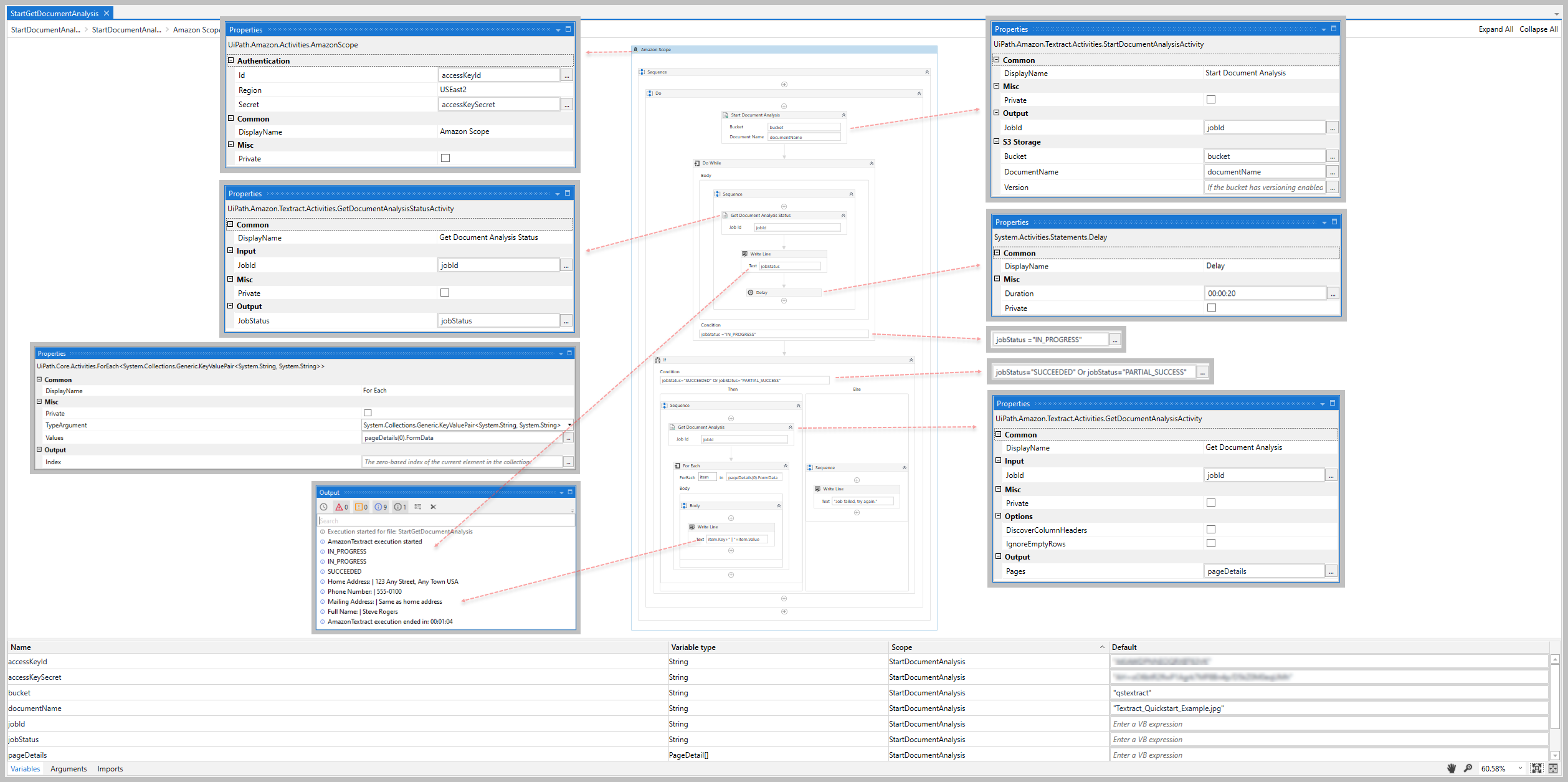
The following image shows an example of the activity dependency relationship and input/output property values.
For step-by-step instructions and examples, see the [Quickstart](https://docs.uipath.com/activities/other/latest/legacy-integrations/amazon-textract-quickstarts#quickstarts) guides.