# Compare Faces
> `UiPath.AmazonRekognition.Activities.CompareFaces`
`UiPath.AmazonRekognition.Activities.CompareFaces`
The **Compare Faces** activity uses the [CompareFaces](https://docs.aws.amazon.com/rekognition/latest/dg/API_CompareFaces.html) API to compare the most prominent face in the source input image (**SourceImagePath** or **SourceImageURL**) to each of the 100 largest faces detected in the target input image (**TargetImagePath** or **TargetImageURL**).
In response, the activity returns an array of face matches ordered by similarity score in descending order. For each face match, the response provides a bounding box of the face and confidence value (a score that indicates how closely the faces match).
## Summary
### Dependencies
| Dependency | Details |
| --- | --- |
| Packages | UiPath.Amazon.Rekognition.Activities |
| Activities | [Amazon Scope](https://docs.uipath.com/activities/other/latest/legacy-integrations/amazon-rekognition-amazon-scope#amazon-scope) |
### Attributes
| Attribute | Details |
| --- | --- |
| Inputs (Variables) | `String` Applies to property: **SourceImagePath**,**SourceImageURL**,**TargetImagePath**, and **TargetImageURL** |
| Outputs (Variables) | `FaceMatch[]` Applies to property: **MatchingFaces** |
| API used | Amazon Rekognition - [CompareFaces](https://docs.aws.amazon.com/rekognition/latest/dg/API_CompareFaces.html) |
| Examples | [Quickstart](https://docs.uipath.com/activities/other/latest/legacy-integrations/amazon-rekognition-compare-faces-quickstart) |
## Properties
The values for the following properties are specified when adding this activity to your project in UiPath Studio.
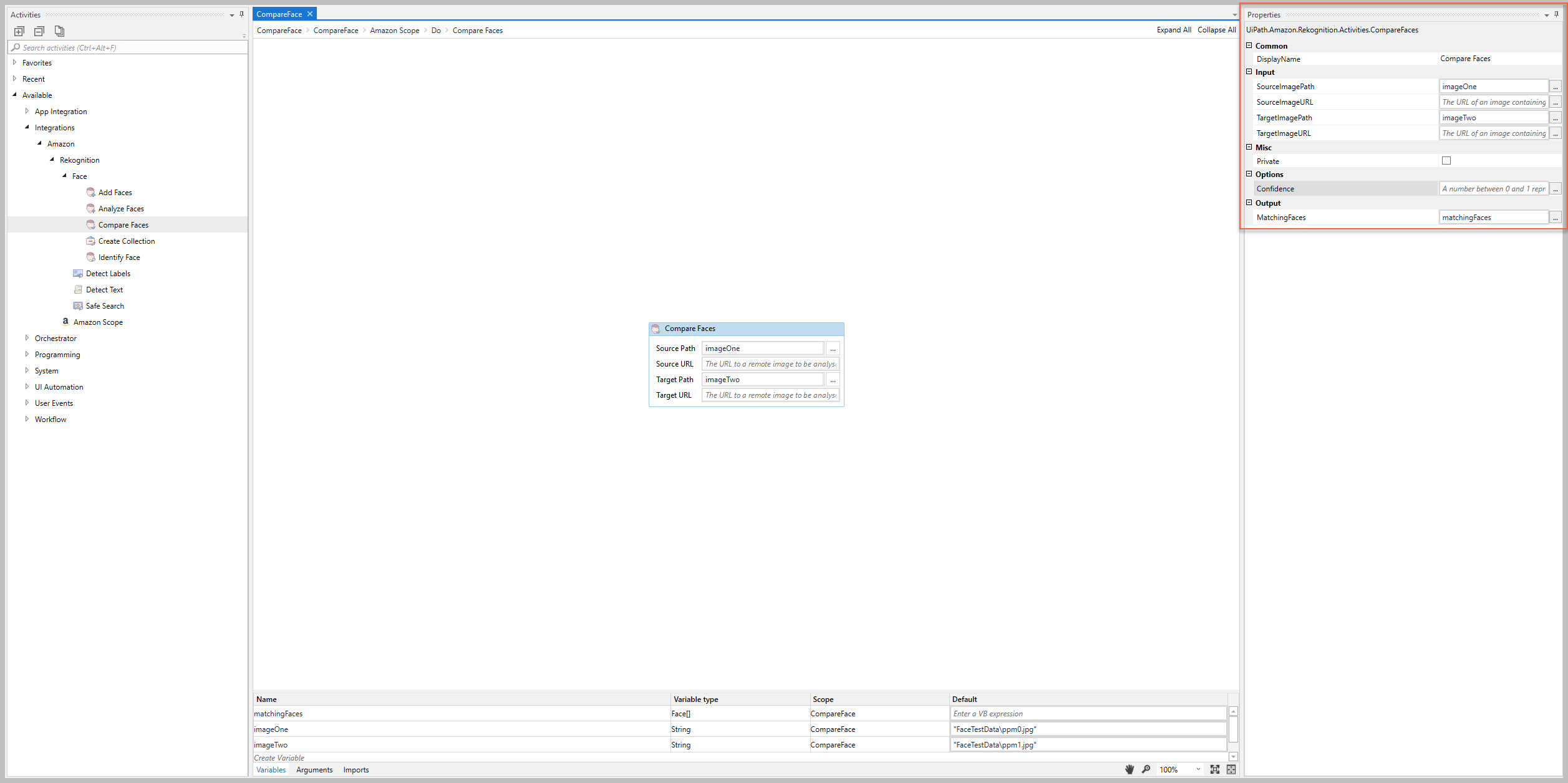
### Common
#### DisplayName
The display name of the activity.
| Attributes | Details |
| --- | --- |
| **Type** | `String` |
| **Required** | Yes |
| **Default value** | *Compare Faces* |
| **Allowed values** | Enter a `String` or `String` variable. |
| **Notes** | N/A |
### Input
#### SourceImagePath
The path to a local image that includes the face you want compared to the target input image.
Attributes
Details
Type
String
Required
Yes (if the SourceImageURL is empty)
Default value
Empty
Allowed values
Enter a String or String variable.
Notes
Either the SourceImagePath or SourceImageURL property is required.
If you enter values for both the SourceImagePath and SourceImageURL , the SourceImagePath value is used.
#### SourceImageURL
The path to a remote image that includes the face you want compared to the target input image.
Attributes
Details
Type
String
Required
Yes (if the SourceImagePath is empty)
Default value
Empty
Allowed values
Enter a String or String variable.
Notes
Either the SourceImagePath or SourceImageURL property is required.
If you enter values for both the SourceImagePath and SourceImageURL , the SourceImagePath value is used.
#### TargetImagePath
The path to a local image that includes the faces you want compared with the source input image.
Attributes
Details
Type
String
Required
Yes (if the TargetImageURL is empty)
Default value
Empty
Allowed values
Enter a String or String variable.
Notes
Either the TargetImagePath or TargetImageURL property is required.
If you enter values for both the TargetImagePath and TargetImageURL , the TargetImagePath value is used.
#### TargetImageURL
The path to a remote image that includes the faces you want compared with the source input image.
Attributes
Description
Type
String
Required
Yes (if the TargetImagePath is empty)
Default value
Empty
Allowed values
Enter a String or String variable.
Notes
Either the TargetImagePath or TargetImageURL property is required.
If you enter values for both the TargetImagePath and TargetImageURL , the TargetImagePath value is used.
### Misc
#### Private
If selected, the values of variables and arguments are no longer logged at Verbose level.
| Attributes | Description |
| --- | --- |
| **Type** | Checkbox |
| **Required** | No |
| **Default value** | Not Selected |
| **Allowed values** | Selected or Not Selected |
| **Notes** | N/A |
### Options
#### Confidence
The minimum confidence value (i.e., percentage of similarity) to consider the faces to be a match.
Attributes
Description
Type
Double
Required
No
Default value
Empty
Allowed values
Enter a number between 0 and 1 to indicate the percentage of similarity (e.g., enter .8 if you want the similarity to be 80%).
Notes
If this property is set, the MatchingFaces property only returns the faces that meet or exceed the specified value
Example: If you enter a value of .8 , the faces in the TargetImagePath or TargetImageURL image are considered a match to the faces in the SourceImagePath or SourceImageURL if the activity returns a confidence level of .8 or greater. If the activity returns a confidence level less than .8, the faces are not considered a match and the MatchingFaces property returns a null value.
### Output
#### MatchingFaces
An array of faces in the target image that match the faces in the source image.
Attributes
Details
Type
FaceMatch[]UiPath.Amazon.Rekognition.Models.FaceMatch[]
Required
No (recommended if you plan to use the output data in subsequent activities)
Default value
Empty
Allowed values
Enter your value as a FaceMatch[] variable.
Notes
If the Confidence value is set, the array only includes the faces that meet or exceed the specified level of similarity.
If you plan to use the For Each activity to process the array output, select UiPath.Amazon.Rekognition.Models.FaceMatch as the TypeArgument.